Build a Better Software Factory with Claude Code
ai-agentsclaude-codeagentic-engineeringsoftware-factorysub-agentsgithubcode-reviewdeveloper-tools
Verdict: A working, installable software factory built from Claude Code sub-agents, with useful ideas (risk-routed reviewers, a deterministic gate, scripts as the only writer of job state) and an honest closing on complexity, cost and production risk; sponsored by Anthropic.
TL;DR
- ZazenCodes (Nov 2026, sponsored by Anthropic) builds version 2 of a software factory that lives inside a project as Claude Code sub-agents, a factory skill and a
factory/folder of shell scripts. It turns labelled GitHub issues into pull requests. - Fable does intake (is it worth building, scope, risk, reject or ask for more information), Opus writes the spec and builds, a deterministic gate runs
checks.sh(lint, type check, tests, build), then parallel reviewers (code, UX, UI design, security) can send the job back to the builder, and an Opus approver either merges the PR or flags it for a human. - The risk rating Fable assigns at intake changes the rest of the run: for risky code the code review moves up from Haiku to Sonnet, and a medium-risk job gets a security reviewer that a low-risk one doesn't. The presenter calls the result a dynamic directed acyclic graph.
- Each job is a
job.jsonthat onlyfactory/bin/jobmay write. Claude calls the script and never edits the file itself, so job state stays deterministic. One orchestrator session runs up to three jobs at once, each in its own worktree and branch, and/factory runpicks the queue back up after the orchestrator is killed. - The closing thoughts say that V2 is better but more complicated, that cheap Haiku reviewers can cost more when they bounce good work back, and that you'd be "a psycho" to point it at production unwatched. The next step is moving it to the cloud with the Claude Agent SDK.
Full summary
What changed in version 2
The video follows an earlier one in which ZazenCodes built a basic software factory that lives inside a project, driven by Claude Code sub-agents. Viewers liked it and suggested improvements, and this version applies them. It takes GitHub issues as input and submits pull requests, runs several jobs in parallel from a single orchestrator, uses Fable and Haiku, and adds deterministic steps to raise the quality of the code. A mind map in Obsidian, offered to newsletter subscribers, lists the changes: an intake step on Fable, more dynamic routing with Haiku agents, more tests through the pipeline, GitHub issues in and PRs out, and better observability of cost and time per job.
The factory flow
The flow diagram runs left to right.
- Intake runs on Fable. It decides whether the issue is worth building, scopes it within the project, assesses risk, and can reject it or ask the author for more information.
- Opus writes the spec and then builds. These are still two steps, though the presenter thinks they could merge.
- The gate is a cheap deterministic step that runs
checks.shon the build. A failure sends the log back to the builder. - Reviewers work in parallel: code review on Haiku (Sonnet if Fable judged the job risky), UX review on Sonnet and UI design review on Haiku when the UI changes, and security review on Opus for security-relevant changes. Any reviewer can ask for changes, and the same builder fixes them.
- The approver, also on Opus, merges the PR automatically or marks it as needing a human.
The presenter routes the code review by risk to show how an early agent's judgement can inform later steps and cut cost. Around this sits what the mind map calls a deterministic spine: shell scripts such as checks.sh, gate, route and job, shipped with the factory, that push jobs through. The commands are /factory run, /factory run <n> for one issue, and /factory <anything> to talk to the factory. There is a dashboard, and concurrency defaults to three jobs, set in factory/config.json.
Installing it
Installation is one prompt pasted into Claude Code in your project: install this software factory from the reference repository, with a link to the source on GitHub. In the demo project, a small sticky-note app called note-wall-app, the install adds a .claude folder with sub-agent definitions and a factory skill whose SKILL.md describes the whole behaviour, plus a factory folder with the bin scripts, checks.sh, config.json and dashboard.html. Claude also adapts the template: checks.sh runs the project's own lint, type check, tests and build, and AGENTS.md gains a Software factory section.
The first issue
The presenter starts a fresh session on Opus 5.5 at low effort and types /factory run. The queue script comes back empty, because issues are only picked up once they carry the factory label, a safety measure so that only issues you choose get processed. With the label on a "Dark mode" issue, the next run creates job 001-dark-mode and Fable starts intake. The dashboard shows each stage. Fable's intake form accepts the issue, rates it low risk, notes that it touches only the UI, and ends with a full agent log. The presenter stresses keeping these files for debugging and for judging the factory over time. You can open the builder sub-agent in Claude Code and steer it, though that level of interaction is not the point of a factory.
The build passes the gate, the UX reviewer approves, and then the code reviewer fails it over one readability gap; the UI reviewer fails it too. After a second round with the builder, both reviews pass and the approver merges the PR without asking. GitHub has the full history: the issue, the PR with the factory's commits, and the merge. After a git pull, the app has a dark mode.
Four issues in parallel
The presenter labels the remaining four issues, runs /factory run 4 for the "Different fonts" issue alone, then /factory run for the rest. Only three jobs run at once because of the concurrency setting. The dashboard now shows time and cost per job: dark mode took 8 minutes and an estimated $3.40, which the presenter didn't actually pay on a Claude plan but finds useful for comparing jobs and optimising the factory. The fonts job stops at needs-human with a decision.md explaining why the builder was blocked. The presenter answers from a second Claude Code session through the factory skill ("just do whatever you want"), which is recorded as feedback-1.md, and the job goes back to building.
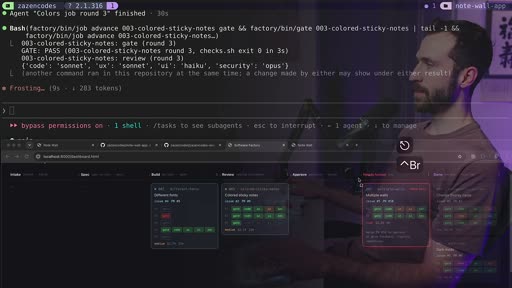
Fable's risk labels change each job's reviewers: changing the display name (low risk) gets code, UX and UI review but no security review, while a medium-risk job gets one, and "multiple walls" is marked high risk. Pressing Ctrl-C in the orchestrator stops every background agent; running /factory run again reads the queue from GitHub and restarts the jobs, losing only the work that was in flight. The fonts job then stalls again, this time on a bug in the factory itself, so the presenter tells it to fix itself and to update the published v2 source too. The remaining jobs are cleared by answering the orchestrator's questions, including a confirmation that the wall-format change may discard test data. The final app demo shows coloured sticky notes and an editable display name.
Deterministic state
Back on the mind map, checks.sh is a bash script that runs npm run lint, npm run typecheck, npm test and npm run build; if it fails, the job never reaches the reviewers. job.json drives every stage. "This is not like a vibey thing that gets updated by Claude code." Only factory/bin/job writes it, with subcommands such as queue (which reads GitHub issues through gh), create, advance, merge and feedback. The jobs folder, with each round's review files, is git-ignored and lives only on your machine, so the presenter suggests building something to persist it, for example to Google Cloud Storage.
Closing thoughts
Version 2 is an improvement but more complicated, and "with complexity doesn't always come improvement," so viewers should look for what they could simplify. The cost figures are estimates at token prices, still useful as a benchmark. Haiku reviewers that don't think the problem through and kick work back could end up costing more, and the presenter is wary of letting Haiku approve merges. GitHub issues already work as an integration point with no extra layer: monitoring of a production system could open labelled issues that the factory picks up. On production use, the presenter agrees you'd be "a psycho" to plug this in and look away, but thinks it can be run while you watch and check it. The presenter expects software development in general to move to this level of abstraction, above today's agent harnesses. Next is running the factory in the cloud, probably with the Claude Agent SDK.
Key moments
- [00:47] Mind map — what's new in v2 and the factory flow diagram with a model per stage. frame_0006.jpg
- [04:57] Install — one prompt adds sub-agents, a factory skill and a
factory/folder of scripts. frame_0013.jpg, frame_0019.jpg - [07:41] Empty queue — nothing runs until an issue has the
factorylabel. frame_0020.jpg - [11:00] Review fails — the Haiku code reviewer and the UI reviewer send dark mode back to the builder. frame_0028.jpg
- [13:01] Auto-merged — the approver merges the PR without asking for a human. frame_0034.jpg
- [16:10] Cost and time — 8 minutes and an estimated $3.40 for the first job.
- [18:30] Risk-routed reviewers — a medium-risk job gets a security reviewer, a low-risk one doesn't.
- [19:30] Ctrl-C and restart — killing the orchestrator stops every agent, and
/factory runresumes from the queue. frame_0049.jpg - [25:30] job.json — only
factory/bin/jobwrites the job state. frame_0066.jpg, frame_0068.jpg - [27:54] Trade-offs — complexity, Haiku cost traps, production use, the cloud next. frame_0072.jpg
Hook microscope (0-10s)
-
Frames: 20 at 2 fps
Read these hook frames with the Read tool:
hook_frames/frame_0001.jpg(t=0.0s)hook_frames/frame_0002.jpg(t=0.5s)hook_frames/frame_0003.jpg(t=1.0s)hook_frames/frame_0004.jpg(t=1.5s)hook_frames/frame_0005.jpg(t=2.0s)hook_frames/frame_0006.jpg(t=2.5s)hook_frames/frame_0007.jpg(t=3.0s)hook_frames/frame_0008.jpg(t=3.5s)hook_frames/frame_0009.jpg(t=4.0s)hook_frames/frame_0010.jpg(t=4.5s)hook_frames/frame_0011.jpg(t=5.0s)hook_frames/frame_0012.jpg(t=5.5s)hook_frames/frame_0013.jpg(t=6.0s)hook_frames/frame_0014.jpg(t=6.5s)hook_frames/frame_0015.jpg(t=7.0s)hook_frames/frame_0016.jpg(t=7.5s)hook_frames/frame_0017.jpg(t=8.0s)hook_frames/frame_0018.jpg(t=8.5s)hook_frames/frame_0019.jpg(t=9.0s)hook_frames/frame_0020.jpg(t=9.5s)
-
Word-level transcript (31 words):
  [  0.07s] today
  [  0.28s] we're
  [  0.56s] building
  [  1.07s] a
  [  1.09s] better
  [  1.44s] software
  [  1.92s] factory
  [  2.47s] with
  [  2.79s] claude
  [  3.26s] code
  [  3.73s] thank
  [  3.87s] you
  [  4.03s] to
  [  4.16s] anthropic
  [  4.81s] for
  [  4.96s] sponsoring
  [  5.62s] today's
  [  6.09s] video
  [  6.44s] in
  [  6.55s] the
  [  6.76s] last
  [  7.01s] video
  [  7.34s] we
  [  7.47s] built
  [  7.80s] a
  [  7.86s] basic
  [  8.19s] software
  [  8.72s] factory
  [  9.19s] that
  [  9.45s] can
  [  9.65s] live
- 0.0s: The presenter talks to camera in a purple-lit room as "Build a Better Software Factory with Claude" types itself on screen, on "Today we're building a better software factory with Claude code".
- by 4.0s: A "This video is sponsored by Anthropic" caption appears under the title as the sponsor is thanked.
- by 7.0s: The title fades out.
- by 8.0s: Cut to a terminal with an ASCII flow chart of the factory (spec writer, builder, four reviewers, approver, merge or needs human), with arrows tracing the flow from builder to reviewers, on "In the last video we built a basic software factory".
Pattern: title promise plus sequel framing (the first factory was popular and viewers asked for improvements), with a flash of the pipeline diagram as visual proof.
Editorial profile
No scene-change data — likely a static/screen-recorded source.
Screencast tutorial with a talking-head intro and outro: terminal (Claude Code, Neovim), an Obsidian mind map, GitHub and the factory dashboard, with the presenter overlaid semi-transparently on the screen recording and purple boxes and arrows drawn over the parts being discussed.
Quotable moments
- [12:00] "it can create an actually bad dynamic when you have code review happening by an agent that's not as intelligent as the builder agent"
- [25:42] "This is not like a vibey thing that gets updated by Claude code."
- [27:36] "Claude does not work on this itself. Claude runs functions in order to update this file."
- [28:11] "with complexity doesn't always come improvement"
- [30:13] "you'd be a a psycho to actually plug this into your real production system"
Entities mentioned
- People: zazencodes
- Companies: Anthropic, GitHub, Google Cloud Storage
- Tools / products: Claude Code, Fable, Opus 5.5, Sonnet, Haiku, Claude Agent SDK, GitHub Issues, GitHub CLI (gh), Obsidian, Neovim, npm, note-wall-app, TLDR skill
Concepts surfaced
- software-factory: agents carry issues through fixed stages to merged pull requests, with humans pulled in only when a stage asks.
- deterministic-spine: scripts own the job state and the transitions, and agents change state only by calling them.
- Risk-routed pipeline: an intake agent's risk rating decides later models and reviewers, making the pipeline a dynamic directed acyclic graph.
- Cheap-reviewer trap: a weaker model reviewing a stronger builder's work can bounce good code and cost more than it saves.
- Label-gated intake: only issues with a
factorylabel enter the pipeline, so a person chooses which issues get processed. - feedback-loop-ceiling: the deterministic gate runs lint, type check, tests and build before any reviewer spends tokens.
- worktree-per-task: each job gets its own worktree and branch and one PR that closes its issue.
Frame timeline
What's said while each frame is on screen.
[00:00]
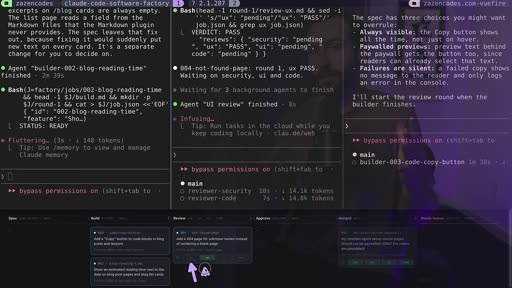
Today we're building a better software factory with Claude code. Thank you to Anthropic for sponsoring today's video. In the last video we built a basic software factory that can live inside of your project. People really seem to like this, like a lot. And there was also a lot of great feedback about how I can make that software factory better. So in today's video I did that. It uses GitHub issues, it submits PRs, it does multiple jobs in parallel from a single...
[01:12]
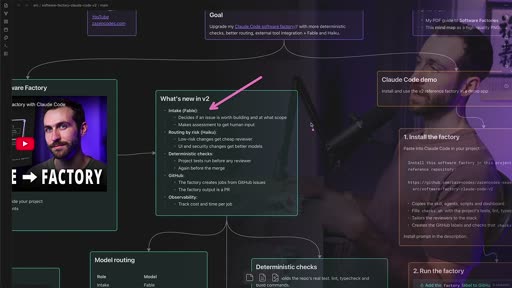
can live inside of your project. This is driven by Claude code sub-agents. If you want to learn more about the historical context of software factories, I still recommend watching the start of that video. Otherwise, this video will have everything you need. Here's what's new in V2. We have an intake step which uses Fable. We've got better routing using Haiku agents and this is more dynamic. We have more determinism built in so that we're doing more tests throughout the...
[02:49]
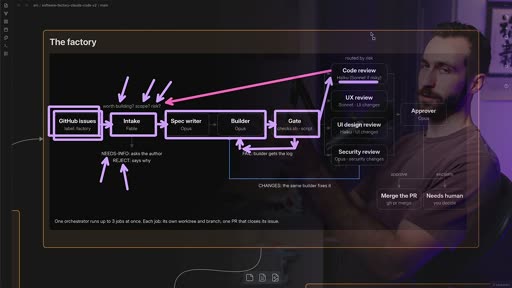
reviewers. And so, we're going to do a code review, and this will be done with Haiku or Sonnet if it's deemed risky. And the risk comes back to this assessment which was made by Fable at the start of the pipeline. And I did this because I wanted to demonstrate how we can use agents inside of our software factory to inform later steps and to potentially cost optimize our software factory. Uh we're also going to go to other reviewers, and we'll do this all in parallel, and...
[04:02]
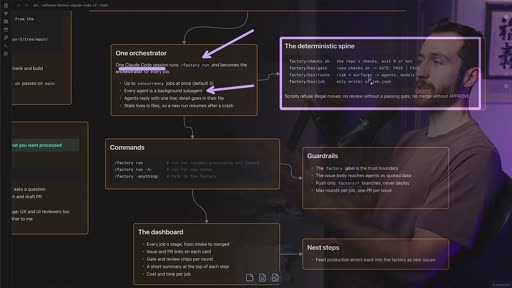
deterministic spine, and what this means is I have actual scripts, like checks.sh, this gate script, this route script. I have a jobs script. These are shell commands that are shipped with the factory. I'll show you these later in the video, and these are doing deterministic things to push our jobs through the the pipeline, through the actual factory. So, we have these commands: factory run, factory run n, where n is a number, like a specific GitHub issue that we want to...
[05:39]
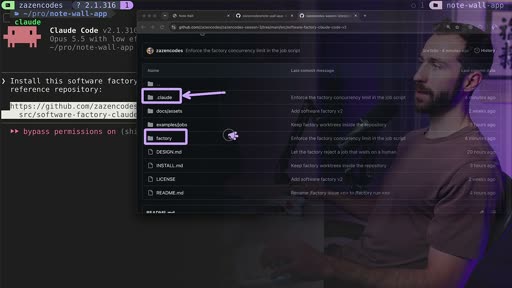
video. And here's that exact link. If you open it up, you'll see something like this, and you'll see that prompt is actually right in here in the source code. So, you can get this in the video description and find this link. You'll notice that we have this folder .claud. We also have this factory folder. Both of these are going to appear inside of your project after this is installed. Let me go ahead and run this. This just finished up, and let me show you what was...
[06:52]
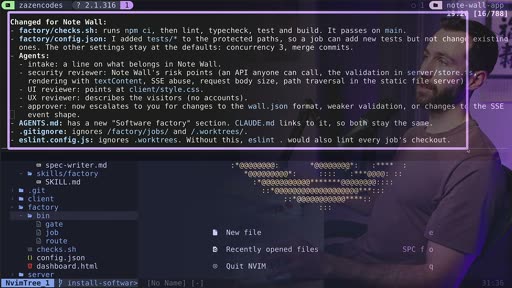
where we can specify behavior of our factory and we have a dashboard file basically observe our factory. Now coming back up I want to show you this. So there's a bunch of stuff Claude says changed for NoteWall and there's a whole bunch of stuff of how the software factory that I provide the template was actually adapted to your project. And the big things are this one. Check dot SH is going to run your actual tests inside of your project. This line right here agents dot MD...
[08:29]
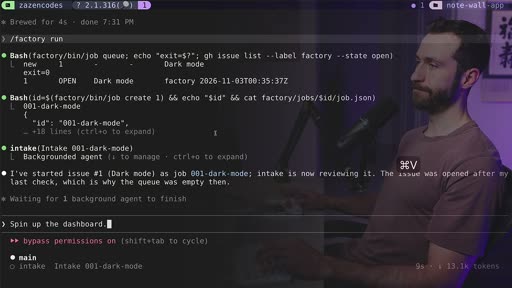
And now that I've done that, I can see this label's been applied. So, I can go back to my factory, and if I run the exact same command again, now it'll pick that up and start processing it through the factory. And we can see it's creating a job, and it is in the intake stage now for this dark mode feature. That is now serving. So, we can see issue one, dark mode, is in the intake step. This is being processed by Fable, and I wanted Fable to do the first step of our factory...
[09:42]
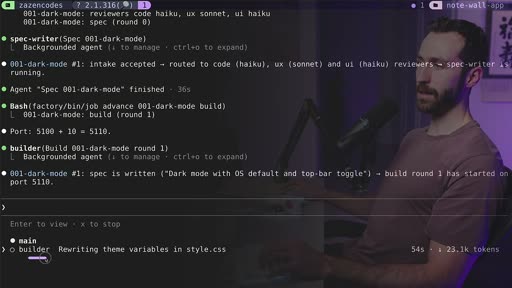
through the factory. It's really important for debugging and analyzing the effectiveness of the factory over time just to keep all of this information around from your job. So, now we're in the builder phase. Let me come back to Claude, and let's see what's going on over here. I can actually see the builder as an agent down here, and this is a sub agent in Claude code. And what I can do is click enter and go into that. So, I can actually see what this sub agent is thinking,...
[10:55]
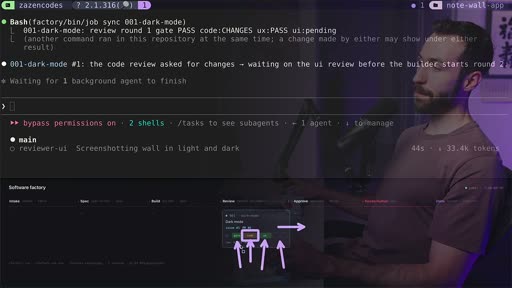
that's why the gate went green here. Now, we see the UX guy just approved, so this is done. We're just waiting on the code review and the UI review. And then we'll go through the rest of the pipeline. But, look at this, the code review just failed. We got orange for the code review. That means we're going to get kicked back to the builder phase. And let me just quickly show you that. So, now we're going to follow this route, and we're going to have to go back to the builder...
[12:32]
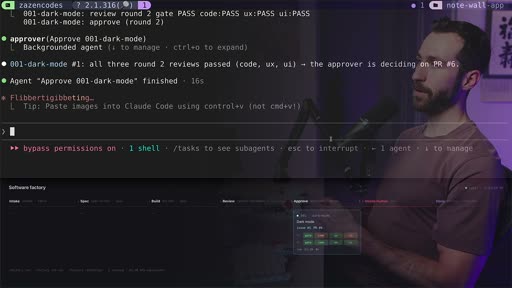
passes as well. Nice. It went green and we are in the approved phase. Now this approver is going to decide if it's can be automatically merged or if it needs human review before it merges. And I think this is a cool thing that our factory can do because it can allow for a lot more autonomous behavior. If it's a straightforward feature that can be merged without us looking, that saves human time. That's valuable and that's something I want my factory doing for me. And indeed...
[13:45]
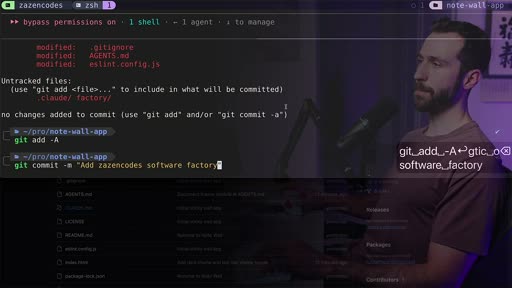
base. Now let's pull these changes in from the remote. So if I say get status, I should see some files that have changed locally. And what we're seeing here are the files and folders that were added or modified when we installed the software factory itself. I never added and committed these. So let me do that now. All right. Adds as in code software factory and these are all the files that we were looking at earlier. You'll also notice that I'm on main right now. So I'm...
[15:22]
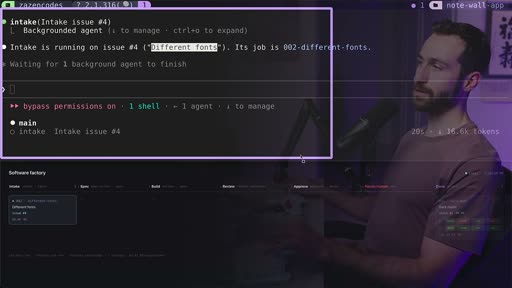
now, it's processing that through our factory. I can check in on that and here it is. Different fonts is now in the intake step. So, Fables having a look at that. Now, let's process the rest. And because this session right here is the orchestrator, I can keep continuing using it and I can use this orchestrator to interact with existing jobs in our factory or I can use it to create new jobs. And that's what I want to do now. So, I'll just say factory run and this is going to...
[16:35]
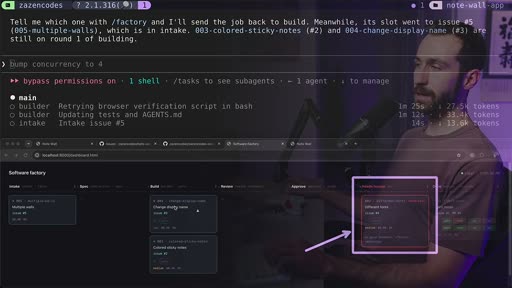
we can use that to try and optimize our factory. We can try and make this more efficient by looking at the job cost and trying to push this down in certain ways. So, I thought that was an important addition to this factory. Now, let's look at what's going on. We have a job that's in the needs human. So, this thing is effectively unpaused. And because of that, we've now automatically started the intake for the final issue. This is called multiple walls. Now, let's focus on...
[18:12]
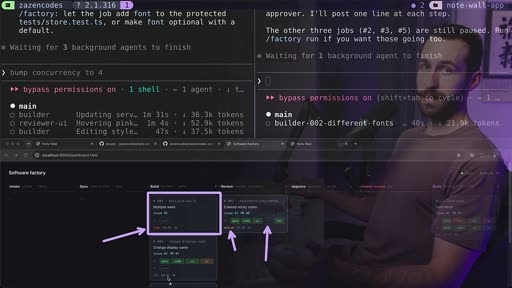
notes is just waiting on the UI, and then this should This one should be built out, and the multiple walls has been called high. So, this is like a high-risk feature, and that's a label that Fable put on our features. These little labels are things that I added from the initial intake step. I'm getting Fable to decide and based on that information, it adapts the factory behavior as we push the job through. Check this out. For changing the display name, it has code, it has...
[19:25]
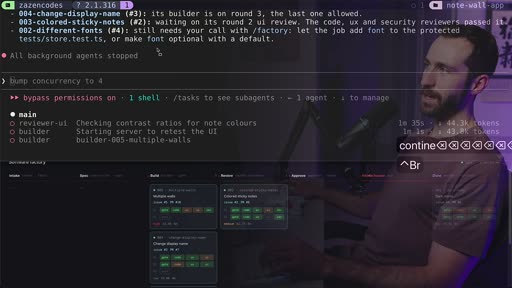
But, if I was to try and kill this session, well, this has a bunch of sub agents associated with it. We also have a shell and this shell is the thing that's actually serving our dashboard. There's no reason Claude has to do that. I could have served it myself manually, but if I try and spin this guy down, see, I just pressed control C and actually all background agents stopped. So, all of these guys have now been just totally halted. That's not good. So, what I'm going to...
[21:02]
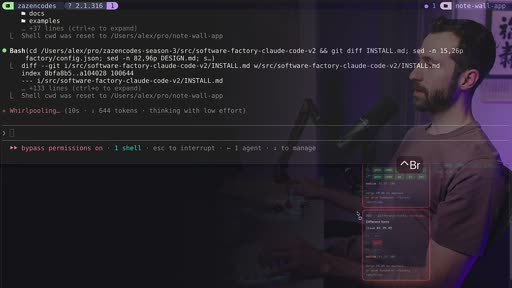
totally clean project and just run this factory command in order to get all the context from inside of here. What's going on with the different fonts? We need a call on this. So, let's see. The fonts is stuck in the factory rule, not the feature. It needs a call from you. All right, so this guy here, different fonts, this was blocked because of an issue with my software factory. So, I just fixed the factory. I told it hey, go fix yourself. This should have never been...
[22:14]
it skips server. May I send it back with move test and run color. Do that. Sounds good for issue number three. Now, these guys here appear to be needing human review, but I've already kicked these along. So, if I refresh this, I can see this one's actually changed. It's getting built now. The multiple walls is still here. What should we do about the multiple walls issue number five? Okay, so for issue number five, we're actually intentionally made it. We're waiting. We're...
[23:27]
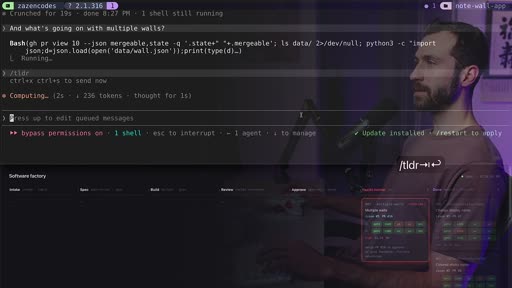
agentic engineer playbook. This just has my like philosophy on agentic engineering and basically this new age that we're going into as software engineers. Now, everything's done except for this last multiple wall. And what's going on with multiple walls? I'm going to get TLDR working on that. It's stalled. It waits on your sign-off for the wall format. One round to merge. Yep, let's do whatever you want and merge it in. We also have links here. I can click this link and...
[25:04]
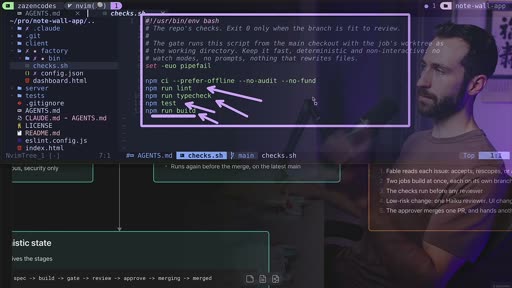
file, and it's going to run through, and it's going to run all these npm commands because we have an npm project. But if you have a different project, you'll be running different tests in here. So, we're doing a linting, we're doing a type check, we're doing npm test, and then we're running a build. We're actually building our project, making sure all of this works. If If something goes wrong here, we do not even get to the reviewers. It hasn't even made it that far because...
[26:17]
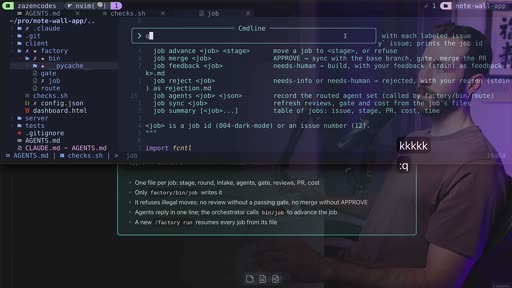
looking at GitHub and seeing what's going on inside of GitHub. So, then there's job create, job advance, job merge. And this is what's responsible for pushing things through our pipeline, running this script. Let me show you the actual jobs. Now, we're not going to see those inside of here because they're being get ignored. If I go into factory and look at everything in here, we have a jobs folder. This is where the actual data of the stuff in our factory lives. You should...
[27:54]
then you can click the link in the video description and sign up now. Let me share some closing thoughts on what we've built today and where I want to take this next. First of all, this is definitely an improvement on my software factory from the previous video. There's a lot of things that I thought through better, and I like how this one is working better than that previous one. However, it's also more complicated. And with complexity doesn't always come improvement. So,...
[29:07]
would be careful about doing. Um potentially the approver could be a Haiku agent. But, then as well, we're like, do we want to put the choice of approving this feature into our code base on Haiku? I don't know if I want to do that. And I really like how we're using GitHub issues and pull requests. And something cool that we could do would be to watch the performance metrics of our actual production system and then be pushing those things automatically into GitHub issues...
[30:44]
something you could do in the way that I showed you how we're controlling it and we're sort of looking at it and we're checking how it goes. Yeah, sure. That's a that's a thing you could do. I think this is a thing you could start with and I think that actually software development in general will go to an abstraction layer that looks like this. That's less about coding agent harnesses like we're seeing them today like Claude um how Claude code works today but instead from...
[31:57]
thoughts on that and thank you for watching.
Transcript
Source: captions.
[00:02] Today we're building a better software factory with Claude code. Thank you to
[00:04] factory with Claude code. Thank you to Anthropic for sponsoring today's video.
[00:07] Anthropic for sponsoring today's video. In the last video we built a basic
[00:08] In the last video we built a basic software factory that can live inside of
[00:11] software factory that can live inside of your project. People really seem to like
[00:13] your project. People really seem to like this, like a lot. And there was also a
[00:17] this, like a lot. And there was also a lot of great feedback about how I can
[00:19] lot of great feedback about how I can make that software factory better. So in
[00:21] make that software factory better. So in today's video I did that. It uses GitHub
[00:23] today's video I did that. It uses GitHub issues, it submits PRs, it does multiple
[00:26] issues, it submits PRs, it does multiple jobs in parallel from a single
[00:27] jobs in parallel from a single orchestrator, it uses Fable and Haiku.
[00:30] orchestrator, it uses Fable and Haiku. And it also has some more deterministic
[00:32] And it also has some more deterministic steps so that we're producing higher
[00:33] steps so that we're producing higher quality code from our factory. In the
[00:35] quality code from our factory. In the hands-on section of the video I'll start
[00:37] hands-on section of the video I'll start by showing you how to install this
[00:39] by showing you how to install this inside of your own project. I'll be
[00:40] inside of your own project. I'll be doing that for one of my projects and
[00:42] doing that for one of my projects and demonstrating how to use it. I would
[00:44] demonstrating how to use it. I would highly encourage you to follow along
[00:46] highly encourage you to follow along with me in that part of the video.
[00:47] with me in that part of the video. Here's the full mind map from the video
[00:49] Here's the full mind map from the video and you can get this if you sign up for
[00:51] and you can get this if you sign up for my email newsletter. I'll send you this
[00:53] my email newsletter. I'll send you this image that you can use as reference. The
[00:54] image that you can use as reference. The big things going on here is this is the
[00:57] big things going on here is this is the factory. I'm going to explain this soon.
[00:59] factory. I'm going to explain this soon. This is the prompt that use to install
[01:01] This is the prompt that use to install this in your own project. Here is my
[01:03] this in your own project. Here is my previous video on software factories. If
[01:05] previous video on software factories. If you didn't watch that, what I did was I
[01:07] you didn't watch that, what I did was I built a modular software factory that
[01:09] built a modular software factory that can live inside of your project. This is
[01:11] can live inside of your project. This is driven by Claude code sub-agents. If you
[01:13] driven by Claude code sub-agents. If you want to learn more about the historical
[01:14] want to learn more about the historical context of software factories, I still
[01:17] context of software factories, I still recommend watching the start of that
[01:18] recommend watching the start of that video. Otherwise, this video will have
[01:20] video. Otherwise, this video will have everything you need. Here's what's new
[01:22] everything you need. Here's what's new in V2. We have an intake step which uses
[01:24] in V2. We have an intake step which uses Fable. We've got better routing using
[01:27] Fable. We've got better routing using Haiku agents and this is more dynamic.
[01:30] Haiku agents and this is more dynamic. We have more determinism built in so
[01:32] We have more determinism built in so that we're doing more tests throughout
[01:34] that we're doing more tests throughout the pipeline so that our software
[01:35] the pipeline so that our software factory is more reliable. It runs on
[01:37] factory is more reliable. It runs on GitHub issues. This is the input and the
[01:39] GitHub issues. This is the input and the output is a PR that gets pushed to our
[01:41] output is a PR that gets pushed to our GitHub project. And we have better
[01:43] GitHub project. And we have better observability and cost and time per job
[01:46] observability and cost and time per job and stuff like that. So to really
[01:48] and stuff like that. So to really understand that, let's look at the
[01:50] understand that, let's look at the factory flow diagram. The input to our
[01:52] factory flow diagram. The input to our factory is a GitHub issue or multiple.
[01:55] factory is a GitHub issue or multiple. It can take in many GitHub issues at
[01:57] It can take in many GitHub issues at once and process them all together. And
[01:59] once and process them all together. And these come into an intake step, which is
[02:01] these come into an intake step, which is Fable. This is a new step in this
[02:03] Fable. This is a new step in this version of the factory where Fable
[02:05] version of the factory where Fable thinks about if this is worth building.
[02:07] thinks about if this is worth building. It scopes it out within the context of
[02:09] It scopes it out within the context of the project. It assesses it for risk,
[02:11] the project. It assesses it for risk, and it could potentially reject the
[02:13] and it could potentially reject the feature or ask for more information from
[02:16] feature or ask for more information from a human. Next, we're going into the spec
[02:18] a human. Next, we're going into the spec writing and building step, and these are
[02:20] writing and building step, and these are still two distinct steps, but I'll talk
[02:23] still two distinct steps, but I'll talk about in my closing thoughts for the
[02:24] about in my closing thoughts for the video how these could probably be merged
[02:26] video how these could probably be merged into a single step. From here, we're
[02:28] into a single step. From here, we're going to push our code through a gate.
[02:29] going to push our code through a gate. This is a new deterministic step, and
[02:32] This is a new deterministic step, and the idea here is that we're really
[02:33] the idea here is that we're really wanting to validate that the software
[02:35] wanting to validate that the software factory is correct. And so, this is a
[02:37] factory is correct. And so, this is a cheap step where we can run this on the
[02:39] cheap step where we can run this on the build and make sure it's looking good.
[02:41] build and make sure it's looking good. And if it's not, we can go back to the
[02:43] And if it's not, we can go back to the builder, and then eventually, when we
[02:44] builder, and then eventually, when we get through the gate, then we go to some
[02:46] get through the gate, then we go to some reviewers. And so, we're going to do a
[02:48] reviewers. And so, we're going to do a code review, and this will be done with
[02:50] code review, and this will be done with Haiku or Sonnet if it's deemed risky.
[02:53] Haiku or Sonnet if it's deemed risky. And the risk comes back to this
[02:55] And the risk comes back to this assessment which was made by Fable at
[02:57] assessment which was made by Fable at the start of the pipeline. And I did
[02:58] the start of the pipeline. And I did this because I wanted to demonstrate how
[03:00] this because I wanted to demonstrate how we can use agents inside of our software
[03:02] we can use agents inside of our software factory to inform later steps and to
[03:05] factory to inform later steps and to potentially cost optimize our software
[03:07] potentially cost optimize our software factory. Uh we're also going to go to
[03:09] factory. Uh we're also going to go to other reviewers, and we'll do this all
[03:10] other reviewers, and we'll do this all in parallel, and depending on the
[03:12] in parallel, and depending on the results of these, we can push the job
[03:14] results of these, we can push the job back to the builder to fix. And once we
[03:16] back to the builder to fix. And once we get through the code review, then we go
[03:17] get through the code review, then we go to an approver step, which decides if
[03:20] to an approver step, which decides if this can be merged automatically or if
[03:22] this can be merged automatically or if this needs human review in order to
[03:24] this needs human review in order to close out the loop on our software
[03:26] close out the loop on our software factory and implement this feature into
[03:28] factory and implement this feature into the codebase. Now, having seen this
[03:29] the codebase. Now, having seen this factory flowchart, there's a whole
[03:31] factory flowchart, there's a whole section of stuff over here, but I want
[03:33] section of stuff over here, but I want to get to this later in the video. This
[03:35] to get to this later in the video. This is more details around the how the
[03:37] is more details around the how the system works. Right now, I want to focus
[03:39] system works. Right now, I want to focus on this, which is how to actually use
[03:41] on this, which is how to actually use this system with Claud code. We start
[03:43] this system with Claud code. We start with an orchestrator, and the
[03:44] with an orchestrator, and the orchestrator is a Claud code session
[03:47] orchestrator is a Claud code session that I'm going to spin up, and inside of
[03:49] that I'm going to spin up, and inside of that session, I'm going to say factory
[03:50] that session, I'm going to say factory run. From here, it will start spinning
[03:52] run. From here, it will start spinning sub agents, background agents in Claud
[03:55] sub agents, background agents in Claud code that will be doing various tasks
[03:57] code that will be doing various tasks within our system. It also has a
[03:59] within our system. It also has a deterministic spine, and what this means
[04:01] deterministic spine, and what this means is I have actual scripts, like
[04:03] is I have actual scripts, like checks.sh, this gate script, this route
[04:06] checks.sh, this gate script, this route script. I have a jobs script. These are
[04:08] script. I have a jobs script. These are shell commands that are shipped with the
[04:10] shell commands that are shipped with the factory. I'll show you these later in
[04:12] factory. I'll show you these later in the video, and these are doing
[04:13] the video, and these are doing deterministic things to push our jobs
[04:15] deterministic things to push our jobs through the the pipeline, through the
[04:17] through the the pipeline, through the actual factory. So, we have these
[04:19] actual factory. So, we have these commands: factory run, factory run n,
[04:22] commands: factory run, factory run n, where n is a number, like a specific
[04:25] where n is a number, like a specific GitHub issue that we want to process.
[04:28] GitHub issue that we want to process. And we can just pass anything we want in
[04:30] And we can just pass anything we want in here. We can just pass any arbitrary
[04:32] here. We can just pass any arbitrary string in order to do stuff within our
[04:34] string in order to do stuff within our factory context inside of our project.
[04:37] factory context inside of our project. And this all comes with the skill that
[04:38] And this all comes with the skill that I'm going to show you how to install in
[04:40] I'm going to show you how to install in the video. Another thing that comes
[04:42] the video. Another thing that comes along with this is a dashboard so that
[04:43] along with this is a dashboard so that we can view everything as it moves
[04:45] we can view everything as it moves through the factory. And the other
[04:47] through the factory. And the other important things to know are that we
[04:48] important things to know are that we have concurrency built in here. So,
[04:50] have concurrency built in here. So, we'll process up to three jobs at once,
[04:52] we'll process up to three jobs at once, and this is a configuration setting,
[04:54] and this is a configuration setting, which you can change after you've
[04:55] which you can change after you've installed the factory in your project.
[04:57] installed the factory in your project. So, let's get started by installing the
[04:59] So, let's get started by installing the factory. So, this is the prompt that you
[05:01] factory. So, this is the prompt that you can copy and paste into your own project
[05:03] can copy and paste into your own project in order to follow along with me in the
[05:05] in order to follow along with me in the demo. So, I'm just going to copy this,
[05:07] demo. So, I'm just going to copy this, and I'm going to go over to my terminal.
[05:09] and I'm going to go over to my terminal. And I'm inside of a project called note
[05:11] And I'm inside of a project called note wall app. Just a simple note
[05:13] wall app. Just a simple note application. I can sort of write stuff.
[05:15] application. I can sort of write stuff. That's it. I've also got this app on
[05:17] That's it. I've also got this app on GitHub, and this is important for the
[05:19] GitHub, and this is important for the issues and the pull requests, which will
[05:21] issues and the pull requests, which will be a core component of our software
[05:22] be a core component of our software factory. So, I'm going to spin up Claude
[05:24] factory. So, I'm going to spin up Claude Code, and we'll use Claude to install
[05:26] Code, and we'll use Claude to install our software factory. And I'm just going
[05:28] our software factory. And I'm just going to paste this in. So, it says, "Install
[05:30] to paste this in. So, it says, "Install this software factory in this project,
[05:32] this software factory in this project, and this is the reference repository."
[05:34] and this is the reference repository." It's a link to my source code for this
[05:37] It's a link to my source code for this video. And here's that exact link. If
[05:39] video. And here's that exact link. If you open it up, you'll see something
[05:40] you open it up, you'll see something like this, and you'll see that prompt is
[05:42] like this, and you'll see that prompt is actually right in here in the source
[05:43] actually right in here in the source code. So, you can get this in the video
[05:45] code. So, you can get this in the video description and find this link. You'll
[05:47] description and find this link. You'll notice that we have this folder .claud.
[05:49] notice that we have this folder .claud. We also have this factory folder. Both
[05:51] We also have this factory folder. Both of these are going to appear inside of
[05:53] of these are going to appear inside of your project after this is installed.
[05:55] your project after this is installed. Let me go ahead and run this.
[05:56] Let me go ahead and run this. This just finished up, and let me show
[05:58] This just finished up, and let me show you what was installed. So, if I go into
[06:00] you what was installed. So, if I go into note wall app and look at this inside of
[06:02] note wall app and look at this inside of Vim, the two main things we've added are
[06:04] Vim, the two main things we've added are this .claud folder, and inside of here I
[06:06] this .claud folder, and inside of here I have a bunch of agents files. These are
[06:08] have a bunch of agents files. These are the sub agents, the descriptions of how
[06:10] the sub agents, the descriptions of how our sub agents in the factory work. And
[06:13] our sub agents in the factory work. And we've got skills and inside of skills
[06:15] we've got skills and inside of skills I've got one new skill installed which
[06:17] I've got one new skill installed which is factory and it has one file called
[06:19] is factory and it has one file called skill dot MD which describes the entire
[06:21] skill dot MD which describes the entire behavior of the factory. But that's not
[06:24] behavior of the factory. But that's not all of the code that you just got. You
[06:25] all of the code that you just got. You also got this folder which is called
[06:27] also got this folder which is called factory and here's where we have all of
[06:29] factory and here's where we have all of the code dependency for the factory. The
[06:32] the code dependency for the factory. The big things to pay attention to are the
[06:33] big things to pay attention to are the bin files. These are what are
[06:35] bin files. These are what are responsible for ingesting and pushing
[06:37] responsible for ingesting and pushing things through the factory as jobs. We
[06:40] things through the factory as jobs. We have check dot SH which does
[06:42] have check dot SH which does deterministic checks like classic CICD
[06:44] deterministic checks like classic CICD stuff as stuff gets pushed through our
[06:46] stuff as stuff gets pushed through our factory. We have a configuration file
[06:48] factory. We have a configuration file where we can specify behavior of our
[06:50] where we can specify behavior of our factory and we have a dashboard file
[06:52] factory and we have a dashboard file basically observe our factory. Now
[06:54] basically observe our factory. Now coming back up I want to show you this.
[06:56] coming back up I want to show you this. So there's a bunch of stuff Claude says
[06:58] So there's a bunch of stuff Claude says changed for NoteWall and there's a whole
[07:00] changed for NoteWall and there's a whole bunch of stuff of how the software
[07:02] bunch of stuff of how the software factory that I provide the template was
[07:04] factory that I provide the template was actually adapted to your project. And
[07:06] actually adapted to your project. And the big things are this one. Check dot
[07:08] the big things are this one. Check dot SH is going to run your actual tests
[07:10] SH is going to run your actual tests inside of your project. This line right
[07:12] inside of your project. This line right here agents dot MD has a new software
[07:14] here agents dot MD has a new software factory sections and let's look at that
[07:16] factory sections and let's look at that new section that was added. It looks
[07:18] new section that was added. It looks like this. Software factory. So we're
[07:20] like this. Software factory. So we're explicitly documenting how to use the
[07:22] explicitly documenting how to use the software factory inside of our agents
[07:25] software factory inside of our agents file. Now let's get out of this and I'm
[07:26] file. Now let's get out of this and I'm going to start a new session up here
[07:28] going to start a new session up here with Claude and I want to actually
[07:29] with Claude and I want to actually demonstrate our software factory in use.
[07:32] demonstrate our software factory in use. Now I'm on Opus 5.5 with low effort. And
[07:35] Now I'm on Opus 5.5 with low effort. And let's see what happens if I just try and
[07:36] let's see what happens if I just try and run the factory right now. I'm going to
[07:38] run the factory right now. I'm going to say factory run. And we're checking.
[07:40] say factory run. And we're checking. Factory bin job queue. We are running a
[07:43] Factory bin job queue. We are running a script inside of our factory to see
[07:45] script inside of our factory to see what's in the queue. And it says oh, it
[07:48] what's in the queue. And it says oh, it came back empty. There's nothing going
[07:49] came back empty. There's nothing going on. So let's go over to GitHub and put
[07:52] on. So let's go over to GitHub and put something in our queue for the factory
[07:53] something in our queue for the factory and you can see that I have a bunch of
[07:55] and you can see that I have a bunch of open issues. However, these don't have
[07:57] open issues. However, these don't have the right label on them. So they're not
[07:59] the right label on them. So they're not going to get picked up by the factory
[08:01] going to get picked up by the factory until we explicitly label them. This is
[08:03] until we explicitly label them. This is just a safety measure that I shipped
[08:05] just a safety measure that I shipped with the factory because the idea is
[08:07] with the factory because the idea is many bit different people might be
[08:09] many bit different people might be adding issues into your project, but you
[08:11] adding issues into your project, but you want to choose which ones get processed
[08:12] want to choose which ones get processed by your factory. Let's pick up just one
[08:15] by your factory. Let's pick up just one issue to start with. I've got this one
[08:16] issue to start with. I've got this one called dark mode, and I'm going to go to
[08:18] called dark mode, and I'm going to go to labels, and I'm going to add the factory
[08:20] labels, and I'm going to add the factory label. If you don't see this, you can
[08:22] label. If you don't see this, you can just create it. It won't exist for your
[08:24] just create it. It won't exist for your project unless you create it yourself.
[08:26] project unless you create it yourself. And now that I've done that, I can see
[08:27] And now that I've done that, I can see this label's been applied. So, I can go
[08:29] this label's been applied. So, I can go back to my factory, and if I run the
[08:31] back to my factory, and if I run the exact same command again, now it'll pick
[08:34] exact same command again, now it'll pick that up and start processing it through
[08:35] that up and start processing it through the factory. And we can see it's
[08:37] the factory. And we can see it's creating a job, and it is in the intake
[08:39] creating a job, and it is in the intake stage now for this dark mode feature.
[08:44] stage now for this dark mode feature. That is now serving. So, we can see
[08:46] That is now serving. So, we can see issue one, dark mode, is in the intake
[08:49] issue one, dark mode, is in the intake step. This is being processed by Fable,
[08:52] step. This is being processed by Fable, and I wanted Fable to do the first step
[08:54] and I wanted Fable to do the first step of our factory because to me, that's
[08:56] of our factory because to me, that's just a really important step to
[08:57] just a really important step to understand what's happening in the
[08:59] understand what's happening in the context of our project. Next, we've
[09:01] context of our project. Next, we've moved into the spec writer. So, I can
[09:03] moved into the spec writer. So, I can show you that if I click into this, we
[09:05] show you that if I click into this, we can get more information. We're going to
[09:06] can get more information. We're going to see a bunch of different files being
[09:08] see a bunch of different files being accumulated as the task gets pushed
[09:11] accumulated as the task gets pushed through the factory. We just saw spec
[09:12] through the factory. We just saw spec got created, and this is what was
[09:14] got created, and this is what was created by the spec writer. But before
[09:16] created by the spec writer. But before that, we had Fable write this intake
[09:19] that, we had Fable write this intake form, and Fable decided to accept it,
[09:21] form, and Fable decided to accept it, and it decided it was low risk. It only
[09:23] and it decided it was low risk. It only touches the UI as a surface, and it has
[09:26] touches the UI as a surface, and it has a little summary of all the sort of big
[09:28] a little summary of all the sort of big things you'd want to know, and then a
[09:30] things you'd want to know, and then a full agent log of like more information
[09:32] full agent log of like more information that Fable was thinking around this
[09:34] that Fable was thinking around this feature. And this is really important in
[09:36] feature. And this is really important in a factory to understand what the agent
[09:38] a factory to understand what the agent was thinking as it pushed your thing
[09:39] was thinking as it pushed your thing through the factory. It's really
[09:40] through the factory. It's really important for debugging and analyzing
[09:42] important for debugging and analyzing the effectiveness of the factory over
[09:44] the effectiveness of the factory over time just to keep all of this
[09:45] time just to keep all of this information around from your job. So,
[09:47] information around from your job. So, now we're in the builder phase. Let me
[09:49] now we're in the builder phase. Let me come back to Claude, and let's see
[09:50] come back to Claude, and let's see what's going on over here. I can
[09:52] what's going on over here. I can actually see the builder as an agent
[09:54] actually see the builder as an agent down here, and this is a sub agent in
[09:56] down here, and this is a sub agent in Claude code. And what I can do is click
[09:58] Claude code. And what I can do is click enter and go into that. So, I can
[10:00] enter and go into that. So, I can actually see what this sub agent is
[10:01] actually see what this sub agent is thinking, and I could steer it. What are
[10:03] thinking, and I could steer it. What are you doing? Now, this level of
[10:05] you doing? Now, this level of interaction with the agent is kind of
[10:07] interaction with the agent is kind of not really the point of the software
[10:09] not really the point of the software factory. I'm going to talk more about
[10:11] factory. I'm going to talk more about that in my closing thoughts, but I just
[10:12] that in my closing thoughts, but I just wanted to show you how you can do this
[10:14] wanted to show you how you can do this with Cloud Code. Let's go back to the
[10:15] with Cloud Code. Let's go back to the main agent. So, this is going to be our
[10:17] main agent. So, this is going to be our orchestrator, and in principle, this
[10:19] orchestrator, and in principle, this could spin up other jobs at the same
[10:21] could spin up other jobs at the same time. Now, let's follow this one task
[10:23] time. Now, let's follow this one task all the way through. The build just
[10:25] all the way through. The build just finished, and we're seeing that now it's
[10:27] finished, and we're seeing that now it's in the review phase. And this means that
[10:29] in the review phase. And this means that it passed the gate. The gate was this
[10:31] it passed the gate. The gate was this deterministic step that we had to go
[10:33] deterministic step that we had to go through, where we're running certain
[10:34] through, where we're running certain tests and linting and stuff like that.
[10:37] tests and linting and stuff like that. And I can show you that go back to
[10:39] And I can show you that go back to Obsidian. This is the part that we just
[10:41] Obsidian. This is the part that we just got through. So, we just went through
[10:42] got through. So, we just went through the gate, and we're getting a green
[10:44] the gate, and we're getting a green check mark on that. And now we're going
[10:46] check mark on that. And now we're going through all of these guys. So, coming
[10:47] through all of these guys. So, coming back to our terminal,
[10:49] back to our terminal, and bringing this back up, we can see
[10:51] and bringing this back up, we can see that's why the gate went green here.
[10:53] that's why the gate went green here. Now, we see the UX guy just approved, so
[10:56] Now, we see the UX guy just approved, so this is done. We're just waiting on the
[10:57] this is done. We're just waiting on the code review and the UI review. And then
[11:00] code review and the UI review. And then we'll go through the rest of the
[11:01] we'll go through the rest of the pipeline. But, look at this, the code
[11:04] pipeline. But, look at this, the code review just failed. We got orange for
[11:06] review just failed. We got orange for the code review. That means we're going
[11:08] the code review. That means we're going to get kicked back to the builder phase.
[11:11] to get kicked back to the builder phase. And let me just quickly show you that.
[11:13] And let me just quickly show you that. So, now we're going to follow this
[11:14] So, now we're going to follow this route, and we're going to have to go
[11:15] route, and we're going to have to go back to the builder with some feedback,
[11:18] back to the builder with some feedback, and then we'll have to get pushed
[11:19] and then we'll have to get pushed through again. So, we're actually seeing
[11:20] through again. So, we're actually seeing this self-fixing recursive aspect of the
[11:23] this self-fixing recursive aspect of the pipeline now. And we can look at that.
[11:25] pipeline now. And we can look at that. We can look at more information. So, let
[11:27] We can look at more information. So, let me come in here, and I'm going to click
[11:28] me come in here, and I'm going to click on the code, and the verdict was one
[11:32] on the code, and the verdict was one readability gap. This reviewer was
[11:34] readability gap. This reviewer was basically really being really picky
[11:36] basically really being really picky about something, and it kicked it back
[11:38] about something, and it kicked it back because like how something was working.
[11:39] because like how something was working. Now, notice how the code review is using
[11:42] Now, notice how the code review is using haiku or only saw on it if it's
[11:44] haiku or only saw on it if it's determined to be risky. I'm going to
[11:46] determined to be risky. I'm going to come back to this later because it turns
[11:48] come back to this later because it turns out that using models like haiku in this
[11:51] out that using models like haiku in this phase of the pipeline might not be such
[11:54] phase of the pipeline might not be such a good idea. These models aren't always
[11:56] a good idea. These models aren't always able to understand the code as well as
[11:58] able to understand the code as well as the builder. So, it can create an
[12:00] the builder. So, it can create an actually bad dynamic when you have code
[12:02] actually bad dynamic when you have code review happening by an agent that's not
[12:04] review happening by an agent that's not as intelligent as the builder agent. In
[12:06] as intelligent as the builder agent. In any case, coming back here, we see that
[12:08] any case, coming back here, we see that the UI has also failed. And so, now Now
[12:11] the UI has also failed. And so, now Now kicked back, and we're going to go
[12:12] kicked back, and we're going to go through another round of reviews after
[12:15] through another round of reviews after we build pass our gate. We're going to
[12:17] we build pass our gate. We're going to have to get these guys to review it
[12:18] have to get these guys to review it again based on the feedback that they've
[12:20] again based on the feedback that they've provided to the builder. And here they
[12:22] provided to the builder. And here they go. They're back into the next round of
[12:23] go. They're back into the next round of review. We can see this time the code is
[12:26] review. We can see this time the code is going green and hopefully the UI agent
[12:28] going green and hopefully the UI agent passes as well. Nice. It went green and
[12:30] passes as well. Nice. It went green and we are in the approved phase. Now this
[12:32] we are in the approved phase. Now this approver is going to decide if it's can
[12:35] approver is going to decide if it's can be automatically merged or if it needs
[12:37] be automatically merged or if it needs human review before it merges. And I
[12:39] human review before it merges. And I think this is a cool thing that our
[12:41] think this is a cool thing that our factory can do because it can allow for
[12:43] factory can do because it can allow for a lot more autonomous behavior. If it's
[12:46] a lot more autonomous behavior. If it's a straightforward feature that can be
[12:47] a straightforward feature that can be merged without us looking, that saves
[12:50] merged without us looking, that saves human time. That's valuable and that's
[12:52] human time. That's valuable and that's something I want my factory doing for
[12:53] something I want my factory doing for me. And indeed it's done. So we can see
[12:55] me. And indeed it's done. So we can see we have a PR that was created for this
[12:58] we have a PR that was created for this and it's been merged. So this has
[12:59] and it's been merged. So this has actually been merged into our production
[13:01] actually been merged into our production code. Let me show you that over on
[13:03] code. Let me show you that over on GitHub. Here it is. It's called dark
[13:05] GitHub. Here it is. It's called dark mode one. This was from the intake step.
[13:08] mode one. This was from the intake step. We actually just wrote some stuff in
[13:09] We actually just wrote some stuff in here 6 minutes ago. I opened a pull
[13:11] here 6 minutes ago. I opened a pull request and then I marked it as
[13:13] request and then I marked it as completed. So let me go to the PR. This
[13:15] completed. So let me go to the PR. This is the one associated with that issue
[13:17] is the one associated with that issue and I added a bunch of stuff. This is
[13:19] and I added a bunch of stuff. This is all the commits that our software
[13:20] all the commits that our software factory was making and then down here
[13:22] factory was making and then down here we're saying pull request successfully
[13:24] we're saying pull request successfully merged and closed. Our system decided it
[13:26] merged and closed. Our system decided it didn't need my attention. It's something
[13:28] didn't need my attention. It's something that could be automatically merged but
[13:30] that could be automatically merged but we have the full history of how this
[13:31] we have the full history of how this worked inside of GitHub which I think is
[13:33] worked inside of GitHub which I think is very powerful for observability. And if
[13:35] very powerful for observability. And if I go to the code, I can see that I
[13:37] I go to the code, I can see that I merged a pull request. This was done a
[13:39] merged a pull request. This was done a minute ago and that's now in the code
[13:41] minute ago and that's now in the code base. Now let's pull these changes in
[13:42] base. Now let's pull these changes in from the remote. So if I say get status,
[13:45] from the remote. So if I say get status, I should see some files that have
[13:47] I should see some files that have changed locally. And what we're seeing
[13:49] changed locally. And what we're seeing here are the files and folders that were
[13:51] here are the files and folders that were added or modified when we installed the
[13:53] added or modified when we installed the software factory itself. I never added
[13:55] software factory itself. I never added and committed these. So let me do that
[13:57] and committed these. So let me do that now. All right. Adds as in code software
[13:59] now. All right. Adds as in code software factory and these are all the files that
[14:01] factory and these are all the files that we were looking at earlier. You'll also
[14:03] we were looking at earlier. You'll also notice that I'm on main right now. So
[14:05] notice that I'm on main right now. So I'm working on my main branch and now
[14:07] I'm working on my main branch and now I'm going to pull in the remote changes
[14:08] I'm going to pull in the remote changes from main. I'll just say get pull. I'm
[14:11] from main. I'll just say get pull. I'm going to have to clean up some merges
[14:12] going to have to clean up some merges but okay, we did auto merging. So it's
[14:14] but okay, we did auto merging. So it's all good. There were some conflicts with
[14:15] all good. There were some conflicts with the agents, but we handled it. So, now
[14:17] the agents, but we handled it. So, now we pulled these changes in and you can
[14:19] we pulled these changes in and you can see a bunch of changes to stuff like the
[14:20] see a bunch of changes to stuff like the style and the theme. This is for our
[14:22] style and the theme. This is for our dark mode feature. Now, let me show you
[14:24] dark mode feature. Now, let me show you that. I'll say npm run dev and let me
[14:26] that. I'll say npm run dev and let me show you this app again. So, here it is.
[14:28] show you this app again. So, here it is. Now, I have a dark mode going on by
[14:29] Now, I have a dark mode going on by default. It's dark now. Okay. So, now
[14:32] default. It's dark now. Okay. So, now that I've showed you how to take one
[14:33] that I've showed you how to take one issue and push it through our entire
[14:35] issue and push it through our entire factory, I want to show you how to do
[14:37] factory, I want to show you how to do this for many issues at once. Now, I've
[14:39] this for many issues at once. Now, I've got four issues open in here. I'm going
[14:41] got four issues open in here. I'm going to grab all of them and I'm going to add
[14:43] to grab all of them and I'm going to add the factory label to all of them at the
[14:45] the factory label to all of them at the same time. And now, all of these guys
[14:47] same time. And now, all of these guys have the factory label. So, let me come
[14:49] have the factory label. So, let me come back to Claude and we're going to
[14:51] back to Claude and we're going to process everything at once. Now, let me
[14:53] process everything at once. Now, let me just come back here. If I run factory
[14:55] just come back here. If I run factory run, it's going to process everything
[14:57] run, it's going to process everything together. But, I could also say factory
[14:59] together. But, I could also say factory run and then just give a single number
[15:01] run and then just give a single number and just process that issue. I want to
[15:02] and just process that issue. I want to demonstrate that right now. So, I'll
[15:04] demonstrate that right now. So, I'll just say factory run and let's just pick
[15:06] just say factory run and let's just pick one issue. Issue number four is called
[15:09] one issue. Issue number four is called different fonts. So, let me just say
[15:11] different fonts. So, let me just say four. It's looking at the queue and
[15:13] four. It's looking at the queue and that's reading all of these from GitHub
[15:15] that's reading all of these from GitHub and it's found the right one in take
[15:17] and it's found the right one in take issue number four, different fonts. And
[15:19] issue number four, different fonts. And now, it's processing that through our
[15:21] now, it's processing that through our factory. I can check in on that and here
[15:23] factory. I can check in on that and here it is. Different fonts is now in the
[15:25] it is. Different fonts is now in the intake step. So, Fables having a look at
[15:27] intake step. So, Fables having a look at that. Now, let's process the rest. And
[15:29] that. Now, let's process the rest. And because this session right here is the
[15:31] because this session right here is the orchestrator, I can keep continuing
[15:33] orchestrator, I can keep continuing using it and I can use this orchestrator
[15:35] using it and I can use this orchestrator to interact with existing jobs in our
[15:38] to interact with existing jobs in our factory or I can use it to create new
[15:40] factory or I can use it to create new jobs. And that's what I want to do now.
[15:42] jobs. And that's what I want to do now. So, I'll just say factory run and this
[15:44] So, I'll just say factory run and this is going to process everything else.
[15:46] is going to process everything else. It's going to pull all of the issues and
[15:48] It's going to pull all of the issues and push them through our factory and we're
[15:49] push them through our factory and we're going to see these all starting to
[15:51] going to see these all starting to appear in the intake step. There they
[15:53] appear in the intake step. There they are. Notice how we just have three
[15:55] are. Notice how we just have three things running. This is because we set
[15:57] things running. This is because we set our concurrency for our factory to
[15:59] our concurrency for our factory to three. What's the uh concurrency
[16:01] three. What's the uh concurrency setting? Currency is three in
[16:03] setting? Currency is three in factory.config.json.
[16:05] factory.config.json. Now, let me show you some other new
[16:06] Now, let me show you some other new stuff that's in our factory. We're
[16:08] stuff that's in our factory. We're timing these jobs. So, I can see this
[16:10] timing these jobs. So, I can see this dark mode job has a time of 8 minutes.
[16:13] dark mode job has a time of 8 minutes. That's how long it took to push through
[16:15] That's how long it took to push through the whole factory. We're also providing
[16:17] the whole factory. We're also providing a cost. So, this one says $3.40. It
[16:20] a cost. So, this one says $3.40. It didn't actually cost me $3.40
[16:22] didn't actually cost me $3.40 to push this through the factory. It was
[16:24] to push this through the factory. It was free for me. I just used my Claude plan.
[16:26] free for me. I just used my Claude plan. However, this gives us an idea of how
[16:28] However, this gives us an idea of how expensive these jobs are when
[16:29] expensive these jobs are when benchmarked against each other, and then
[16:32] benchmarked against each other, and then we can use that to try and optimize our
[16:33] we can use that to try and optimize our factory. We can try and make this more
[16:35] factory. We can try and make this more efficient by looking at the job cost and
[16:37] efficient by looking at the job cost and trying to push this down in certain
[16:38] trying to push this down in certain ways. So, I thought that was an
[16:39] ways. So, I thought that was an important addition to this factory. Now,
[16:42] important addition to this factory. Now, let's look at what's going on. We have a
[16:43] let's look at what's going on. We have a job that's in the needs human. So, this
[16:45] job that's in the needs human. So, this thing is effectively unpaused. And
[16:47] thing is effectively unpaused. And because of that, we've now automatically
[16:49] because of that, we've now automatically started the intake for the final issue.
[16:52] started the intake for the final issue. This is called multiple walls. Now,
[16:54] This is called multiple walls. Now, let's focus on this step that needs
[16:56] let's focus on this step that needs human review. There's two ways that we
[16:58] human review. There's two ways that we can do this in our application. The
[17:00] can do this in our application. The first way is I could actually click on
[17:02] first way is I could actually click on it, and now I can start to sort of look
[17:04] it, and now I can start to sort of look at it and examine these files which are
[17:05] at it and examine these files which are being written durably to our factory.
[17:08] being written durably to our factory. So, I can see that the build has been
[17:10] So, I can see that the build has been blocked, and there's this decision.md
[17:12] blocked, and there's this decision.md why the builder was blocked. This is not
[17:14] why the builder was blocked. This is not how I would inter- interface with the
[17:16] how I would inter- interface with the factory. I would just talk to Claude up
[17:17] factory. I would just talk to Claude up here. This guy is the orchestrator. He's
[17:19] here. This guy is the orchestrator. He's managing everything, but his chat is
[17:21] managing everything, but his chat is fairly free for me to talk to. Or what I
[17:23] fairly free for me to talk to. Or what I could do is spin up a new Claude code
[17:25] could do is spin up a new Claude code instance inside the same project. And as
[17:28] instance inside the same project. And as long as I use the factory skill, I can
[17:30] long as I use the factory skill, I can just ask whatever I want. What happened
[17:31] just ask whatever I want. What happened with the different fonts task? I can see
[17:34] with the different fonts task? I can see this needs a decision for me. What
[17:36] this needs a decision for me. What happened? Intake accepted the issue with
[17:38] happened? Intake accepted the issue with a narrower scope. It doesn't really know
[17:40] a narrower scope. It doesn't really know what to do for font. Default to
[17:41] what to do for font. Default to handwriting. It wants some input from
[17:43] handwriting. It wants some input from me. Now, because this is a video and I
[17:44] me. Now, because this is a video and I don't really care, yeah, just do
[17:46] don't really care, yeah, just do whatever you want. Let's get this going
[17:47] whatever you want. Let's get this going again. So, that should be able to push
[17:49] again. So, that should be able to push this task back along. I've basically
[17:51] this task back along. I've basically made my decision, and now our software
[17:53] made my decision, and now our software factory should pick this up, and you can
[17:55] factory should pick this up, and you can see we've just added this feedback
[17:57] see we've just added this feedback one.md. I can click in there, and it
[17:59] one.md. I can click in there, and it says, "Yeah, just do whatever you want.
[18:01] says, "Yeah, just do whatever you want. Let's get this going again." And now
[18:03] Let's get this going again." And now we'll see this job go somewhere, and
[18:05] we'll see this job go somewhere, and here it is. It's back in the building
[18:06] here it is. It's back in the building phase. Meanwhile, our colored sticky
[18:08] phase. Meanwhile, our colored sticky notes is just waiting on the UI, and
[18:10] notes is just waiting on the UI, and then this should This one should be
[18:12] then this should This one should be built out, and the multiple walls has
[18:14] built out, and the multiple walls has been called high. So, this is like a
[18:17] been called high. So, this is like a high-risk feature, and that's a label
[18:19] high-risk feature, and that's a label that Fable put on our features. These
[18:21] that Fable put on our features. These little labels are things that I added
[18:23] little labels are things that I added from the initial intake step. I'm
[18:25] from the initial intake step. I'm getting Fable to decide and based on
[18:27] getting Fable to decide and based on that information, it adapts the factory
[18:29] that information, it adapts the factory behavior as we push the job through.
[18:31] behavior as we push the job through. Check this out. For changing the display
[18:33] Check this out. For changing the display name, it has code, it has UX and UI, but
[18:36] name, it has code, it has UX and UI, but there's no security reviewer on that.
[18:38] there's no security reviewer on that. Whereas this guy does have a security
[18:39] Whereas this guy does have a security reviewer and the reason was because this
[18:41] reviewer and the reason was because this was a medium difficulty. Therefore, it
[18:44] was a medium difficulty. Therefore, it was assigned a security review step.
[18:46] was assigned a security review step. Whereas this guy was low, so he was not
[18:48] Whereas this guy was low, so he was not assigned a security review step. This is
[18:51] assigned a security review step. This is just a behavior because I wanted to
[18:54] just a behavior because I wanted to illustrate how we can change and make
[18:56] illustrate how we can change and make our software factory dynamic.
[18:57] our software factory dynamic. Effectively, a dynamic directed acyclic
[19:00] Effectively, a dynamic directed acyclic graph. And this can help with
[19:01] graph. And this can help with efficiencies of your factory. Again,
[19:04] efficiencies of your factory. Again, I'll speak more about efficiencies and
[19:06] I'll speak more about efficiencies and my thinking around that in my closing
[19:08] my thinking around that in my closing thoughts in the video. Now, let me clean
[19:09] thoughts in the video. Now, let me clean up what's going on up here. I've got two
[19:11] up what's going on up here. I've got two Claude sessions going on. This guy on
[19:13] Claude sessions going on. This guy on the right, I just used to interact with
[19:15] the right, I just used to interact with our factory, but I'm fine to spin that
[19:17] our factory, but I'm fine to spin that one down. I could just totally get rid
[19:19] one down. I could just totally get rid of that. Nothing changes in our factory.
[19:21] of that. Nothing changes in our factory. But, if I was to try and kill this
[19:23] But, if I was to try and kill this session, well, this has a bunch of sub
[19:25] session, well, this has a bunch of sub agents associated with it. We also have
[19:27] agents associated with it. We also have a shell and this shell is the thing
[19:29] a shell and this shell is the thing that's actually serving our dashboard.
[19:31] that's actually serving our dashboard. There's no reason Claude has to do that.
[19:33] There's no reason Claude has to do that. I could have served it myself manually,
[19:35] I could have served it myself manually, but if I try and spin this guy down,
[19:37] but if I try and spin this guy down, see, I just pressed control C and
[19:39] see, I just pressed control C and actually all background agents stopped.
[19:41] actually all background agents stopped. So, all of these guys have now been just
[19:43] So, all of these guys have now been just totally halted. That's not good. So,
[19:46] totally halted. That's not good. So, what I'm going to say is factory run.
[19:49] what I'm going to say is factory run. And what this should do is
[19:51] And what this should do is look at the current state. It's looking
[19:53] look at the current state. It's looking at the queue. So, it went back to
[19:54] at the queue. So, it went back to GitHub. It's like, what's going on? It
[19:56] GitHub. It's like, what's going on? It looks at the queue and now it should
[19:57] looks at the queue and now it should spin all these guys back up. So, in that
[19:59] spin all these guys back up. So, in that sense, the factory is fairly durable.
[20:02] sense, the factory is fairly durable. Now, I'm sure I just lost a little bit
[20:04] Now, I'm sure I just lost a little bit of work because whatever those sub
[20:05] of work because whatever those sub agents were doing, we've now spun up new
[20:07] agents were doing, we've now spun up new sub agents and you can see these guys
[20:09] sub agents and you can see these guys all just started from scratch. So, any
[20:11] all just started from scratch. So, any work that was currently in flight just
[20:13] work that was currently in flight just got completely annihilated and we're
[20:15] got completely annihilated and we're we're restarting that. So, in
[20:16] we're restarting that. So, in particular, this UI step was currently
[20:19] particular, this UI step was currently ongoing and that got blown up and we
[20:20] ongoing and that got blown up and we restarted it. It's not a good idea to do
[20:23] restarted it. It's not a good idea to do that, but um the factory is pretty
[20:25] that, but um the factory is pretty durable, right? I just showed you how we
[20:26] durable, right? I just showed you how we stopped it and we were able to spin it
[20:28] stopped it and we were able to spin it back up and now things are getting
[20:29] back up and now things are getting pushed through. And now I can see
[20:30] pushed through. And now I can see everything's accumulated here. It either
[20:32] everything's accumulated here. It either needs review and then there's two that
[20:34] needs review and then there's two that have finished. And looking at this in
[20:36] have finished. And looking at this in GitHub, now I can see we've got flag
[20:38] GitHub, now I can see we've got flag from our software factory on three
[20:39] from our software factory on three issues. And if I go to the pull request,
[20:42] issues. And if I go to the pull request, three open PRs for each of these and
[20:45] three open PRs for each of these and there's two closed ones. And in the
[20:46] there's two closed ones. And in the source code itself, of course, we're
[20:48] source code itself, of course, we're going to see that that was pulled in.
[20:50] going to see that that was pulled in. Merge pull request number seven, change
[20:52] Merge pull request number seven, change display name. Now, coming back to our
[20:54] display name. Now, coming back to our factory, and I just love this idea that
[20:56] factory, and I just love this idea that we can come back to it with a very
[20:57] we can come back to it with a very totally clean project and just run this
[21:00] totally clean project and just run this factory command in order to get all the
[21:02] factory command in order to get all the context from inside of here. What's
[21:04] context from inside of here. What's going on with the different fonts? We
[21:06] going on with the different fonts? We need a call on this.
[21:08] need a call on this. So, let's see. The fonts is stuck in the
[21:10] So, let's see. The fonts is stuck in the factory rule, not the feature. It needs
[21:12] factory rule, not the feature. It needs a call from you. All right, so this guy
[21:14] a call from you. All right, so this guy here, different fonts, this was blocked
[21:16] here, different fonts, this was blocked because of an issue with my software
[21:18] because of an issue with my software factory. So, I just fixed the factory. I
[21:21] factory. So, I just fixed the factory. I told it hey, go fix yourself. This
[21:23] told it hey, go fix yourself. This should have never been blocked. We
[21:24] should have never been blocked. We should have been able to keep building
[21:25] should have been able to keep building this. When I wrote it up here,
[21:27] this. When I wrote it up here, I just want to be real with you guys. I
[21:29] I just want to be real with you guys. I was like, also update V2 factory in
[21:31] was like, also update V2 factory in Zazon code season 3. So, that means the
[21:33] Zazon code season 3. So, that means the factory you install will have this fix.
[21:35] factory you install will have this fix. Like, this should be fixed for you. So,
[21:37] Like, this should be fixed for you. So, this has got picked up and now it's
[21:38] this has got picked up and now it's getting tossed back to the builder
[21:40] getting tossed back to the builder phase. So, we will work through that
[21:42] phase. So, we will work through that one. Now, let's talk about the other
[21:43] one. Now, let's talk about the other ones. Now, since I've already loaded my
[21:45] ones. Now, since I've already loaded my factory, I'm just going to ask questions
[21:47] factory, I'm just going to ask questions directly. How about issue number five?
[21:48] directly. How about issue number five? What's going on there? All right, now
[21:50] What's going on there? All right, now there's some noise going on because this
[21:52] there's some noise going on because this other job's running, but this is what it
[21:53] other job's running, but this is what it said. There's a lot of stuff in here.
[21:55] said. There's a lot of stuff in here. I've got this skill. This is just my own
[21:57] I've got this skill. This is just my own skill. It's called TLDR. So, what my
[21:59] skill. It's called TLDR. So, what my TLDR skill does is it just shortens the
[22:01] TLDR skill does is it just shortens the output of the agent. Okay, I trust you
[22:04] output of the agent. Okay, I trust you to handle this one properly. You can do
[22:06] to handle this one properly. You can do that. Next, what's going on with issue
[22:07] that. Next, what's going on with issue number three, the colored sticky notes?
[22:10] number three, the colored sticky notes? The new color tester never runs because
[22:12] The new color tester never runs because it skips server. May I send it back with
[22:14] it skips server. May I send it back with move test and run color. Do that. Sounds
[22:16] move test and run color. Do that. Sounds good for issue number three. Now, these
[22:19] good for issue number three. Now, these guys here appear to be needing human
[22:21] guys here appear to be needing human review, but I've already kicked these
[22:22] review, but I've already kicked these along. So, if I refresh this, I can see
[22:24] along. So, if I refresh this, I can see this one's actually changed. It's
[22:26] this one's actually changed. It's getting built now. The multiple walls is
[22:29] getting built now. The multiple walls is still here. What should we do about the
[22:31] still here. What should we do about the multiple walls issue number five? Okay,
[22:34] multiple walls issue number five? Okay, so for issue number five, we're actually
[22:36] so for issue number five, we're actually intentionally made it. We're waiting.
[22:38] intentionally made it. We're waiting. We're waiting for these other tasks to
[22:39] We're waiting for these other tasks to finish. The orchestrator has some sort
[22:41] finish. The orchestrator has some sort of shared understanding, right, of
[22:43] of shared understanding, right, of what's going on in the system and we're
[22:44] what's going on in the system and we're waiting on this until these guys have
[22:46] waiting on this until these guys have finished and then we're going to merge
[22:48] finished and then we're going to merge this PR in.
[22:50] this PR in. That makes sense to me. And notice how
[22:51] That makes sense to me. And notice how we keep getting these TLDRs. That's from
[22:53] we keep getting these TLDRs. That's from my skill, so I could just say this and
[22:55] my skill, so I could just say this and I'll say, "Stop outputting TLDR." I'll
[22:58] I'll say, "Stop outputting TLDR." I'll leave a link to this and my other ones
[23:00] leave a link to this and my other ones in the video description. If you like
[23:02] in the video description. If you like them, please leave me a star. Helps me
[23:03] them, please leave me a star. Helps me out a lot on this channel and with my
[23:05] out a lot on this channel and with my brand. And if you're enjoying this video
[23:07] brand. And if you're enjoying this video on software factories, you can get my
[23:08] on software factories, you can get my PDF guide if you sign up for my
[23:10] PDF guide if you sign up for my newsletter. This just has a structured
[23:13] newsletter. This just has a structured summary of what we talked about in this
[23:14] summary of what we talked about in this video, along with links and installation
[23:16] video, along with links and installation commands. You can send this to your
[23:18] commands. You can send this to your friends or use it yourself. This is my
[23:19] friends or use it yourself. This is my newsletter. I just send one email a
[23:21] newsletter. I just send one email a week. And if you sign up for this, I'll
[23:23] week. And if you sign up for this, I'll also give you some other stuffs like my
[23:25] also give you some other stuffs like my agentic engineer playbook. This just has
[23:27] agentic engineer playbook. This just has my like philosophy on agentic
[23:30] my like philosophy on agentic engineering and basically this new age
[23:32] engineering and basically this new age that we're going into as software
[23:34] that we're going into as software engineers. Now, everything's done except
[23:36] engineers. Now, everything's done except for this last multiple wall. And what's
[23:38] for this last multiple wall. And what's going on with multiple walls? I'm going
[23:40] going on with multiple walls? I'm going to get TLDR working on that. It's
[23:42] to get TLDR working on that. It's stalled. It waits on your sign-off for
[23:44] stalled. It waits on your sign-off for the wall format.
[23:46] the wall format. One round to merge.
[23:48] One round to merge. Yep, let's do whatever you want and
[23:50] Yep, let's do whatever you want and merge it in. We also have links here. I
[23:52] merge it in. We also have links here. I can click this link and open up the PR
[23:54] can click this link and open up the PR directly. Okay, I think it's worried
[23:56] directly. Okay, I think it's worried about throwing out some data. This is
[23:58] about throwing out some data. This is just a test app, I don't care. Yeah,
[24:00] just a test app, I don't care. Yeah, just get rid of the data right now. Just
[24:01] just get rid of the data right now. Just test data, it doesn't matter. I love
[24:03] test data, it doesn't matter. I love this one. I love how it's like actually
[24:05] this one. I love how it's like actually recording these. So, we have factory bin
[24:07] recording these. So, we have factory bin job feedback. This is a function in our
[24:09] job feedback. This is a function in our factory that explicitly sets feedback
[24:12] factory that explicitly sets feedback from the user and we have tons of these
[24:14] from the user and we have tons of these functions. I want to show you these in
[24:15] functions. I want to show you these in in just a minute. We're about to get to
[24:17] in just a minute. We're about to get to this. Let me just show you the final
[24:18] this. Let me just show you the final version of the application. So, I'll
[24:20] version of the application. So, I'll pull all the changes in. So, here's our
[24:23] pull all the changes in. So, here's our our thing. We can now change the color
[24:25] our thing. We can now change the color of the sticky notes. That's cool. This
[24:28] of the sticky notes. That's cool. This one will be red. Let's go with red.
[24:31] one will be red. Let's go with red. Yeah, nice. Okay. And there was also Oh,
[24:34] Yeah, nice. Okay. And there was also Oh, I can change my name. Okay, cool. Now,
[24:36] I can change my name. Okay, cool. Now, if I do new one, I'm talk now.
[24:40] if I do new one, I'm talk now. Yeah, there he is. Okay. Go back to our
[24:43] Yeah, there he is. Okay. Go back to our mind map and sort of walk through these.
[24:45] mind map and sort of walk through these. So, the deterministic checks are handled
[24:47] So, the deterministic checks are handled by this checks.sh.
[24:49] by this checks.sh. This is something that checks and
[24:51] This is something that checks and deterministically fails if we're not
[24:53] deterministically fails if we're not meeting the right
[24:55] meeting the right things that we need in our project. If
[24:57] things that we need in our project. If we're not passing the tests, and it's
[24:58] we're not passing the tests, and it's very simple. Look at this. It's a bash
[25:00] very simple. Look at this. It's a bash file, and it's going to run through, and
[25:02] file, and it's going to run through, and it's going to run all these npm commands
[25:04] it's going to run all these npm commands because we have an npm project. But if
[25:06] because we have an npm project. But if you have a different project, you'll be
[25:08] you have a different project, you'll be running different tests in here. So,
[25:09] running different tests in here. So, we're doing a linting, we're doing a
[25:11] we're doing a linting, we're doing a type check, we're doing npm test, and
[25:13] type check, we're doing npm test, and then we're running a build. We're
[25:15] then we're running a build. We're actually building our project, making
[25:16] actually building our project, making sure all of this works. If If something
[25:18] sure all of this works. If If something goes wrong here, we do not even get to
[25:20] goes wrong here, we do not even get to the reviewers. It hasn't even made it
[25:22] the reviewers. It hasn't even made it that far because this gate is put in
[25:24] that far because this gate is put in place right in front of them. So,
[25:25] place right in front of them. So, job.json drives all of the stages. This
[25:29] job.json drives all of the stages. This is a file that's on your computer that
[25:31] is a file that's on your computer that lives and represents the job as it gets
[25:33] lives and represents the job as it gets pushed through the factory. And this
[25:35] pushed through the factory. And this thing is only written It's only updated
[25:38] thing is only written It's only updated by factory bin job. This is not like a
[25:42] by factory bin job. This is not like a vibey thing that gets updated by Claude
[25:44] vibey thing that gets updated by Claude code. Claude code calls factory bin job
[25:47] code. Claude code calls factory bin job in order to update this JSON file. And
[25:51] in order to update this JSON file. And let me show you that. It'll be very
[25:52] let me show you that. It'll be very obvious when you look at this. Let me
[25:54] obvious when you look at this. Let me look at job inside of here. And it says
[25:56] look at job inside of here. And it says right at the top, "The only writer of
[25:58] right at the top, "The only writer of factory jobs job ID job.json." We have
[26:02] factory jobs job ID job.json." We have all these different commands like job
[26:03] all these different commands like job queue. This looks at the queue of what's
[26:05] queue. This looks at the queue of what's going on. If I follow queue, we can kind
[26:07] going on. If I follow queue, we can kind of see
[26:09] of see probably This might be a bit messy, but
[26:11] probably This might be a bit messy, but we're going to be looking at GitHub. Do
[26:12] we're going to be looking at GitHub. Do you see issues equals gh.json? This is
[26:15] you see issues equals gh.json? This is looking at GitHub and seeing what's
[26:17] looking at GitHub and seeing what's going on inside of GitHub. So, then
[26:19] going on inside of GitHub. So, then there's job create, job advance, job
[26:21] there's job create, job advance, job merge. And this is what's responsible
[26:23] merge. And this is what's responsible for pushing things through our pipeline,
[26:25] for pushing things through our pipeline, running this script. Let me show you the
[26:27] running this script. Let me show you the actual jobs. Now, we're not going to see
[26:28] actual jobs. Now, we're not going to see those inside of here because they're
[26:30] those inside of here because they're being get ignored. If I go into factory
[26:34] being get ignored. If I go into factory and look at everything in here, we have
[26:35] and look at everything in here, we have a jobs folder. This is where the actual
[26:38] a jobs folder. This is where the actual data of the stuff in our factory lives.
[26:40] data of the stuff in our factory lives. You should know that this data just
[26:42] You should know that this data just lives on your computer. This is being
[26:44] lives on your computer. This is being get ignored. It's not being got backed
[26:46] get ignored. It's not being got backed up to GitHub. So, if you wanted to
[26:47] up to GitHub. So, if you wanted to persist this, you could build something
[26:49] persist this, you could build something in in order to persist this separately,
[26:51] in in order to persist this separately, and that's what I would do. I would
[26:52] and that's what I would do. I would build in something that saves this data
[26:54] build in something that saves this data to Google Cloud Storage, and I would
[26:56] to Google Cloud Storage, and I would just say, "Hey Claude, I want to save
[26:58] just say, "Hey Claude, I want to save this stuff to Cloud Storage. Let's set
[27:00] this stuff to Cloud Storage. Let's set up a workflow for doing that. It'll
[27:01] up a workflow for doing that. It'll handle that for you." This is the data
[27:03] handle that for you." This is the data that we keep seeing in our factory,
[27:04] that we keep seeing in our factory, including round one, round two, round
[27:06] including round one, round two, round three. This is the data that if I look
[27:08] three. This is the data that if I look inside of here is populating all of
[27:10] inside of here is populating all of these files right here. Um it's just
[27:12] these files right here. Um it's just coming from those markdown files that's
[27:14] coming from those markdown files that's on that's on my actual system. And I've
[27:16] on that's on my actual system. And I've got this job.json. So, this guy right
[27:18] got this job.json. So, this guy right here, this is the file that is being
[27:20] here, this is the file that is being edited by those bin scripts. When it
[27:22] edited by those bin scripts. When it says only factory bin job writes it,
[27:25] says only factory bin job writes it, this is the thing that is making our
[27:27] this is the thing that is making our software factory durable and properly
[27:30] software factory durable and properly passing jobs through the life cycle of
[27:32] passing jobs through the life cycle of the factory. The big point is that this
[27:34] the factory. The big point is that this thing is worked on programmatically.
[27:36] thing is worked on programmatically. Claude does not work on this itself.
[27:38] Claude does not work on this itself. Claude runs functions in order to update
[27:40] Claude runs functions in order to update this file. Hope that's clear. That's
[27:42] this file. Hope that's clear. That's really important for how our factory is
[27:44] really important for how our factory is working. Right, we've pretty much
[27:46] working. Right, we've pretty much covered everything. Thank you to
[27:47] covered everything. Thank you to Anthropic for sponsoring today's video.
[27:49] Anthropic for sponsoring today's video. And if you're not using Claude Code yet,
[27:51] And if you're not using Claude Code yet, then you can click the link in the video
[27:53] then you can click the link in the video description and sign up now. Let me
[27:54] description and sign up now. Let me share some closing thoughts on what
[27:56] share some closing thoughts on what we've built today and where I want to
[27:57] we've built today and where I want to take this next. First of all, this is
[28:00] take this next. First of all, this is definitely an improvement on my software
[28:02] definitely an improvement on my software factory from the previous video. There's
[28:04] factory from the previous video. There's a lot of things that I thought through
[28:06] a lot of things that I thought through better, and I like how this one is
[28:07] better, and I like how this one is working better than that previous one.
[28:09] working better than that previous one. However, it's also more complicated. And
[28:11] However, it's also more complicated. And with complexity doesn't always come
[28:13] with complexity doesn't always come improvement. So, I would encourage you
[28:15] improvement. So, I would encourage you to look at this factory and say, "How
[28:17] to look at this factory and say, "How could I actually simplify this a little
[28:19] could I actually simplify this a little bit for myself while still getting all
[28:20] bit for myself while still getting all the performance that that I want out of
[28:22] the performance that that I want out of the factory?" Next thing I want to talk
[28:24] the factory?" Next thing I want to talk through is cost. So, we're tracking the
[28:25] through is cost. So, we're tracking the cost or like the estimated cost if we
[28:28] cost or like the estimated cost if we were paying token prices. Again, we're
[28:30] were paying token prices. Again, we're not paying token prices, so that's
[28:32] not paying token prices, so that's something to keep in mind, but it's
[28:34] something to keep in mind, but it's still a good benchmark that we can use
[28:35] still a good benchmark that we can use to try and optimize the cost over time
[28:37] to try and optimize the cost over time and compare the cost of different jobs.
[28:39] and compare the cost of different jobs. And what we might want to try and do is
[28:41] And what we might want to try and do is use cheaper models like Haiku at certain
[28:44] use cheaper models like Haiku at certain places in the pipeline. For example,
[28:46] places in the pipeline. For example, maybe we could use Haiku in the reviewer
[28:48] maybe we could use Haiku in the reviewer phases. However, if we're doing this and
[28:50] phases. However, if we're doing this and now the reviewers are failing because
[28:52] now the reviewers are failing because they're using Haiku and they're just not
[28:54] they're using Haiku and they're just not really thinking very intelligently about
[28:56] really thinking very intelligently about the problem and then they're kicking
[28:58] the problem and then they're kicking work back to the builder, that could
[28:59] work back to the builder, that could actually end us end up costing us more
[29:01] actually end us end up costing us more money. So, that's something I would I
[29:03] money. So, that's something I would I would be careful about doing. Um
[29:05] would be careful about doing. Um potentially the approver could be a
[29:07] potentially the approver could be a Haiku agent. But, then as well, we're
[29:09] Haiku agent. But, then as well, we're like, do we want to put the choice of
[29:11] like, do we want to put the choice of approving this feature into our code
[29:13] approving this feature into our code base on Haiku? I don't know if I want to
[29:15] base on Haiku? I don't know if I want to do that. And I really like how we're
[29:17] do that. And I really like how we're using GitHub issues and pull requests.
[29:19] using GitHub issues and pull requests. And something cool that we could do
[29:21] And something cool that we could do would be to watch the performance
[29:22] would be to watch the performance metrics of our actual production system
[29:25] metrics of our actual production system and then be pushing those things
[29:26] and then be pushing those things automatically into GitHub issues where
[29:28] automatically into GitHub issues where they could then be ingested into the
[29:30] they could then be ingested into the factory. So, if we wanted to basically
[29:32] factory. So, if we wanted to basically bring in a layer of, you know,
[29:34] bring in a layer of, you know, post-implementation monitoring, like
[29:37] post-implementation monitoring, like post-production uh deployment monitoring
[29:40] post-production uh deployment monitoring in our actual system, we could do that
[29:42] in our actual system, we could do that through this exact factory, through the
[29:44] through this exact factory, through the GitHub issues, like form factor. We can
[29:46] GitHub issues, like form factor. We can be getting other systems, any other
[29:49] be getting other systems, any other system we have, to be pushing GitHub
[29:51] system we have, to be pushing GitHub issues into our project, adding the
[29:53] issues into our project, adding the factory label, and then it gets picked
[29:55] factory label, and then it gets picked up here and pushed through our system.
[29:56] up here and pushed through our system. So, we don't actually need like extra
[29:58] So, we don't actually need like extra layers in order to attach things like
[30:00] layers in order to attach things like observability. That's pretty much
[30:02] observability. That's pretty much already handled for us by the GitHub
[30:04] already handled for us by the GitHub issues. Okay, the last thing I want to
[30:06] issues. Okay, the last thing I want to talk about is actually using this in
[30:08] talk about is actually using this in production. So, this is the big
[30:10] production. So, this is the big complaint with software factories. It's
[30:12] complaint with software factories. It's like, okay, yeah, that's cool, but you'd
[30:13] like, okay, yeah, that's cool, but you'd be a a psycho to actually plug this into
[30:16] be a a psycho to actually plug this into your real production system.
[30:18] your real production system. And I would have to agree with you,
[30:19] And I would have to agree with you, right? This is a 30-minute video that
[30:22] right? This is a 30-minute video that you've watched about how software
[30:24] you've watched about how software factories work, how you can build one
[30:26] factories work, how you can build one for yourself. I'm not telling you that
[30:28] for yourself. I'm not telling you that you should take the code that I've
[30:30] you should take the code that I've showed you in today and plug it into
[30:32] showed you in today and plug it into your production system and close your
[30:34] your production system and close your eyes and get your agents chugging
[30:35] eyes and get your agents chugging through all of your all of your issues
[30:37] through all of your all of your issues for you and building your application in
[30:40] for you and building your application in in that [music] way. Um I do think it's
[30:42] in that [music] way. Um I do think it's something you could do in the way that I
[30:44] something you could do in the way that I showed you how we're controlling it and
[30:46] showed you how we're controlling it and we're sort of looking at it and we're
[30:47] we're sort of looking at it and we're checking how it goes. Yeah, sure. That's
[30:49] checking how it goes. Yeah, sure. That's a that's a thing you could do. I think
[30:51] a that's a thing you could do. I think this is a thing you could start with and
[30:53] this is a thing you could start with and I think that actually software
[30:56] I think that actually software development in general will go to an
[30:57] development in general will go to an abstraction layer that looks like this.
[30:59] abstraction layer that looks like this. That's less about coding agent harnesses
[31:01] That's less about coding agent harnesses like we're seeing them today like Claude
[31:04] like we're seeing them today like Claude um how Claude code works today but
[31:06] um how Claude code works today but instead from a higher level like super
[31:08] instead from a higher level like super Claude code where you're you're sort of
[31:10] Claude code where you're you're sort of managing above the agent harness level
[31:12] managing above the agent harness level in the same type of way as we're seeing
[31:14] in the same type of way as we're seeing this video. So I think the concept of a
[31:16] this video. So I think the concept of a software factory is very important to
[31:17] software factory is very important to understand. I think what I'm showing you
[31:19] understand. I think what I'm showing you today could be the basis of something
[31:21] today could be the basis of something that would work in a production system
[31:23] that would work in a production system um and I think that you just have to be
[31:25] um and I think that you just have to be very thoughtful about actually how that
[31:27] very thoughtful about actually how that should should happen for you. Um and I
[31:30] should should happen for you. Um and I and I'd love to hear your thoughts on
[31:31] and I'd love to hear your thoughts on that as well. So what's next for me with
[31:33] that as well. So what's next for me with my software factory? Well, I'd love to
[31:35] my software factory? Well, I'd love to hear in the comments ways that we you
[31:37] hear in the comments ways that we you think this can be improved or modified
[31:39] think this can be improved or modified but the big thing I'm thinking is how do
[31:41] but the big thing I'm thinking is how do we get this running in the cloud? Like I
[31:43] we get this running in the cloud? Like I don't want to run this on my computer
[31:45] don't want to run this on my computer anymore. I want this just automatically
[31:47] anymore. I want this just automatically running somewhere and I think the Claude
[31:49] running somewhere and I think the Claude agent SDK would be the way to go for
[31:51] agent SDK would be the way to go for this. So that's what I'm considering for
[31:53] this. So that's what I'm considering for my next video. Love to hear your
[31:54] my next video. Love to hear your thoughts on that and thank you for
[31:56] thoughts on that and thank you for watching.
All frames
Total: 80. Hero frames flagged with star.
frames/frame_0001.jpg(t=00:00)frames/frame_0002.jpg(t=00:24)frames/frame_0003.jpg(t=00:49)frames/frame_0004.jpg(t=01:13)frames/frame_0005.jpg(t=01:37)frames/frame_0006.jpg(t=02:01)frames/frame_0007.jpg(t=02:26)frames/frame_0008.jpg(t=02:50)frames/frame_0009.jpg(t=03:14)frames/frame_0010.jpg(t=03:38)frames/frame_0011.jpg(t=04:03)frames/frame_0012.jpg(t=04:27)frames/frame_0013.jpg(t=04:51)frames/frame_0014.jpg(t=05:16)frames/frame_0015.jpg(t=05:40)frames/frame_0016.jpg(t=06:04)frames/frame_0017.jpg(t=06:28)frames/frame_0018.jpg(t=06:53)frames/frame_0019.jpg(t=07:17)frames/frame_0020.jpg(t=07:41)frames/frame_0021.jpg(t=08:05)frames/frame_0022.jpg(t=08:30)frames/frame_0023.jpg(t=08:54)frames/frame_0024.jpg(t=09:18)frames/frame_0025.jpg(t=09:43)frames/frame_0026.jpg(t=10:07)frames/frame_0027.jpg(t=10:31)frames/frame_0028.jpg(t=10:55)frames/frame_0029.jpg(t=11:20)frames/frame_0030.jpg(t=11:44)frames/frame_0031.jpg(t=12:08)frames/frame_0032.jpg(t=12:32)frames/frame_0033.jpg(t=12:57)frames/frame_0034.jpg(t=13:21)frames/frame_0035.jpg(t=13:45)frames/frame_0036.jpg(t=14:10)frames/frame_0037.jpg(t=14:34)frames/frame_0038.jpg(t=14:58)frames/frame_0039.jpg(t=15:22)frames/frame_0040.jpg(t=15:47)frames/frame_0041.jpg(t=16:11)frames/frame_0042.jpg(t=16:35)frames/frame_0043.jpg(t=16:59)frames/frame_0044.jpg(t=17:24)frames/frame_0045.jpg(t=17:48)frames/frame_0046.jpg(t=18:12)frames/frame_0047.jpg(t=18:36)frames/frame_0048.jpg(t=19:01)frames/frame_0049.jpg(t=19:25)frames/frame_0050.jpg(t=19:49)frames/frame_0051.jpg(t=20:14)frames/frame_0052.jpg(t=20:38)frames/frame_0053.jpg(t=21:02)frames/frame_0054.jpg(t=21:26)frames/frame_0055.jpg(t=21:51)frames/frame_0056.jpg(t=22:15)frames/frame_0057.jpg(t=22:39)frames/frame_0058.jpg(t=23:03)frames/frame_0059.jpg(t=23:28)frames/frame_0060.jpg(t=23:52)frames/frame_0061.jpg(t=24:16)frames/frame_0062.jpg(t=24:41)frames/frame_0063.jpg(t=25:05)frames/frame_0064.jpg(t=25:29)frames/frame_0065.jpg(t=25:53)frames/frame_0066.jpg(t=26:18)frames/frame_0067.jpg(t=26:42)frames/frame_0068.jpg(t=27:06)frames/frame_0069.jpg(t=27:30)frames/frame_0070.jpg(t=27:55)frames/frame_0071.jpg(t=28:19)frames/frame_0072.jpg(t=28:43)frames/frame_0073.jpg(t=29:08)frames/frame_0074.jpg(t=29:32)frames/frame_0075.jpg(t=29:56)frames/frame_0076.jpg(t=30:20)frames/frame_0077.jpg(t=30:45)frames/frame_0078.jpg(t=31:09)frames/frame_0079.jpg(t=31:33)frames/frame_0080.jpg(t=31:57)