TUIOS Makes Herdr and Tmux Feel Ancient
developer-toolsterminaltmuxmultiplexertuiosherdrworkmux
Verdict: Omer rates TUIOS above tmux, Herdr, Zellij and Ghostty on visuals (floating draggable panes, minimize, Vim-style modes, a which-key style prefix menu, tiling on demand, a web UI) and would use it on a fresh remote box; sessions are not fully baked and it has no agent features, so he stays on tmux and points to workmux
TL;DR
- Omer Hamerman (DevOps Toolbox, Sept 2026) tries TUIOS, an open-source "terminal UI operating system" by a developer from the Emirates. It behaves like a small desktop inside the terminal: panes float, can be dragged with the mouse, minimized to a label at the bottom, snapped to halves or quarters, or switched into a tiled layout.
- The interface borrows from Vim and LazyVim:
h/lsend a pane to half the screen,ienters terminal mode, and the tmux prefixCtrl-bopens a menu of next keys.Ctrl-popens a fuzzy command palette. A separatetuios-webbinary serves the same session over HTTP for remote control or collaboration, and layouts can be saved and restored. - Sessions are the weak spot: a running session lists as "detached",
lssometimes comes back empty,attachstarts a new session, and there's no detach command, onlyprefix d. - He calls it a "fantastic multiplexer" for a remote host, a temporary cloud instance or an agent box, and he isn't leaving tmux. TUIOS has no agent monitoring, which Herdr does, and his own pick for that is workmux.
- Side note: Mitchell Hashimoto (HashiCorp, Ghostty) has announced a terminal multiplexing company whose demos look like what TUIOS ships today.
Full summary
Why another multiplexer
The video opens on a mock "trigger warning" for viewers tired of new terminal tools, then names the field: tmux, Herdr, Zellij and Ghostty. Omer says none of them is as sleek as TUIOS, which he describes as a tiling manager and "a terminal UI operating system, if you will". His answer to "why does the world need another multiplexer?" is that he isn't leaving tmux, not for Zellij and not for Herdr, which already runs in his home lab. Tools like this earn a place on machines where porting his tmux setup isn't worth it. He also points to Mitchell Hashimoto, who has announced a company for terminal multiplexing and shown demos with smooth panes, fuzzy pickers and curved edges with auto-tiling. TUIOS, he argues, already does much of that.
Windows that behave like a desktop
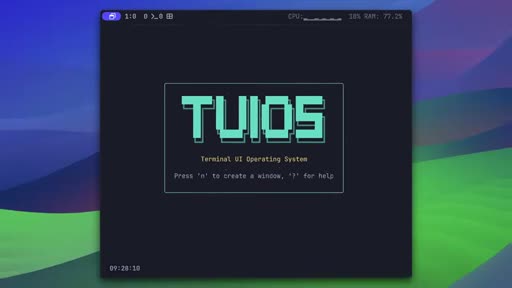
TUIOS installs with brew install tuios. n opens a small floating pane, h and l throw it to the left or right half, and 1-4 put a pane in a screen quarter, with short animations as panes move. New panes open mid-screen and can overlap. m minimizes a pane to a green label at the bottom, Shift-m restores all of them, x kills one, f goes full screen and r renames. Vim users get the modes they expect: normal mode moves windows around, and i switches to terminal mode, with the active border highlighted, so keys reach the shell. With top and htop running in several panes the layout stays tidy. Omer's doubts are about overlap, since stacked panes are hard to tell apart, and renaming, which doesn't show clearly that you're editing a name. The whole thing is mouse-aware too: panes can be clicked, minimized from their title bar, zoomed and dragged, and in tiling mode a dragged pane drops into a slot.
Prefix menu, palette and tiling
TUIOS keeps tmux's Ctrl-b prefix but shows a menu of the next possible keys, the way LazyVim does. That menu nests: t opens window commands, and t again toggles tiling mode. Tiling swaps the floating windows for a conventional split layout, and he says it looks beautiful split like that, with room to breathe. Ctrl-p opens a fuzzy command palette with every action.
Sessions, web access and config
He had his hopes up for sessions, the tmux feature he loves enough to have built his own session manager, and found them "not super polished". The session list calls the session you're in "detached". After quitting, ls can come back empty, so attach creates a new session. There is a kill-session command and no detach command; prefix d works, but every session still shows as detached. "Either that or I'm not getting something. You be the judge." TUIOS also has a copy mode, a debug log and tuios-web, a separate binary that serves the session through a browser. Layouts can be saved and reloaded from the palette, and he'd like that as a tmux plugin. The config is a TOML file under ~/.config/tuios covering borders, buttons, a clock and CPU and memory in a top status bar. He would limit how much of it is configurable.
Verdict
"The bottom line is TUIOS has it all when it comes to visuals." He'd put it on a remote host, a temporary cloud instance or an agent box. Agent automation and monitoring aren't part of TUIOS, so viewers shouting "Herdr" at the screen are, in his words, "not wrong". The docs also list a tape scripting feature and a worktree option, which he leaves for a follow-up. His own pick is workmux, "the sweet spot of multiplexing, monitoring, and full terminal control".
Key moments
- [00:01] Mock trigger warning — "footage of someone trying yet another shiny new tool"; tmux, Herdr, Zellij and Ghostty named as the field.
- [01:16] What TUIOS is — floating draggable panes, Vim-like keys, workspaces, optional tiling, tape scripting; built by a developer from the Emirates.
- [01:48] Why another multiplexer — he's staying on tmux; tools like this belong on home-lab and throwaway machines (frame_0003).
- [02:24] Mitchell Hashimoto's terminal company — it claims hand-written, no-AI code, which Omer doubts will last; its demos show features TUIOS already has.
- [02:57] First panes —
n,h/lhalves,1-4quarters,mminimize (frame_0004 shows the TUIOS start screen),xkill. - [04:22] Modes —
ifor terminal mode with a highlighted border,ffull screen; overlapping panes are hard to read (frame_0007). - [06:42] Prefix menu and tiling —
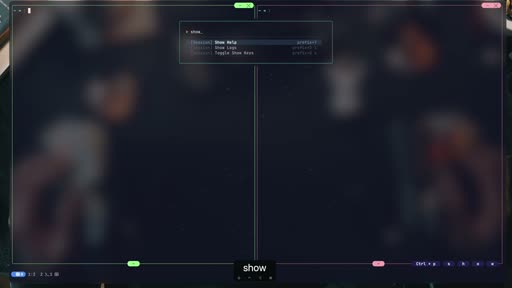
Ctrl-bshows a which-key style menu;t,ttoggles tiling. - [07:31] Command palette —
Ctrl-pfuzzy search over every action (frame_0009). - [07:48] Sessions — listed as detached while attached,
attachcreates new sessions, no detach command. - [09:20] Web UI and layouts —
tuios-webserves panes over HTTP; saved layouts reload from the palette. - [11:21] Verdict — great visuals, sessions not done, no agent features; he recommends workmux.
Hook microscope (0-10s)
-
Frames: 20 at 2 fps
Read these hook frames with the Read tool:
hook_frames/frame_0001.jpg(t=0.0s)hook_frames/frame_0002.jpg(t=0.5s)hook_frames/frame_0003.jpg(t=1.0s)hook_frames/frame_0004.jpg(t=1.5s)hook_frames/frame_0005.jpg(t=2.0s)hook_frames/frame_0006.jpg(t=2.5s)hook_frames/frame_0007.jpg(t=3.0s)hook_frames/frame_0008.jpg(t=3.5s)hook_frames/frame_0009.jpg(t=4.0s)hook_frames/frame_0010.jpg(t=4.5s)hook_frames/frame_0011.jpg(t=5.0s)hook_frames/frame_0012.jpg(t=5.5s)hook_frames/frame_0013.jpg(t=6.0s)hook_frames/frame_0014.jpg(t=6.5s)hook_frames/frame_0015.jpg(t=7.0s)hook_frames/frame_0016.jpg(t=7.5s)hook_frames/frame_0017.jpg(t=8.0s)hook_frames/frame_0018.jpg(t=8.5s)hook_frames/frame_0019.jpg(t=9.0s)hook_frames/frame_0020.jpg(t=9.5s)
-
Word-level transcript (34 words):
  [  0.10s] Trigger
  [  0.35s] warning:
  [  0.76s] the
  [  0.94s] following
  [  1.37s] video
  [  1.63s] contains
  [  2.08s] footage
  [  2.48s] of
  [  2.59s] someone
  [  2.99s] trying
  [  3.33s] yet
  [  3.52s] another
  [  4.07s] shiny
  [  4.32s] new
  [  4.56s] tool
  [  4.82s] that
  [  5.08s] may
  [  5.27s] be
  [  5.50s] harmful
  [  5.86s] to
  [  5.99s] some
  [  6.25s] audiences.
  [  7.03s] If
  [  7.16s] this
  [  7.42s] is
  [  7.55s] you,
  [  7.87s] just
  [  8.13s] scroll
  [  8.52s] to
  [  8.65s] the
  [  8.84s] bottom
  [  9.23s] and
  [  9.42s] comment
  [ 10.00s] with
The first frames are a tight talking-head shot (frame_0001) while he reads a mock content warning: "the following video contains footage of someone trying yet another shiny new tool that may be harmful to some audiences." The joke is aimed at viewers tired of new terminal tools, and he tells them to scroll down and "comment with rage". Within 25 seconds he names the competitors and promises "something you've never seen before".
Editorial profile
- Shots: 12
- Cuts/min: 1.01
- Mean shot length: 59.36s
- Median shot length: 56.47s
- Talking-head ratio: n/a (opencv not installed)
Talking head in a home studio (keyboards on the wall, mic in frame), cut with full-screen macOS terminal demos and on-screen keystroke captions (frame_0009). Dry, joking delivery, with one sponsor segment near the middle.
Quotable moments
- [00:01] "Trigger warning. The following video contains footage of someone trying yet another shiny new tool that may be harmful to some audiences."
- [01:59] "Let's be honest, I'm not leaving tmux. Not for Zellij, not even for Herdr."
- [08:06] "Either that or I'm not getting something. You be the judge."
- [11:01] "The bottom line is TUIOS has it all when it comes to visuals, the motions, the mouse control, the beautiful defaults."
Entities mentioned
- People: omer-hamerman, mitchell-hashimoto, DHH
- Companies: HashiCorp
- Tools / products: tuios, tuios-web, tmux, herdr, Zellij, Ghostty, workmux, LazyVim, Vim, top, htop, Homebrew
- Places: none
Concepts surfaced
- Terminal as desktop: TUIOS treats the terminal like a windowing system, with floating, draggable, minimizable panes and tiling as an option.
- Discoverable prefix: keep tmux's
Ctrl-b, then show the possible next keys (as LazyVim does), so new users don't need a cheat sheet. - augment-over-replace: Omer keeps tmux as his daily driver and uses new multiplexers only on machines where porting his config isn't worth it.
- agent-native-multiplexer: TUIOS is the counter-example, polished as a multiplexer with no agent features; Herdr and workmux cover that.
Frame timeline
What's said while each frame is on screen.
[00:00]
Trigger warning. The following video contains footage of someone trying yet another shiny new tool that may be harmful to some audiences. If this is you, just scroll to the bottom and comment with rage. If you love the terminal, you're about to see something you've never seen before, something different, a concept. No, not a concept, a project that's ready for you to adopt. You've seen Timox, you've seen Herder. If you're on this channel, you've seen Ghosty and Zelage. And...
[00:24]
You've seen Timox, you've seen Herder. If you're on this channel, you've seen Ghosty and Zelage. And while all provide some form of multiplexing, none of them are sleek, smooth, or as innovative as Tuios or Tuios. Anyway, depending on your nerd level, you may have also noticed Mitchell Hashimoto, creator of Ghosty, launching a terminal company meant to provide the next generation of multipplexing with demos that are so smooth you'd want to grab it and try. What if I told...
[01:48]

Emirates who's taunting you from their GitHub page. [music] I'm sure the HH would approve. Let's stop for a second and ask the question 83% of you are currently yelling at the screen. Why does the world need another multiplexer? And while I can say why not and move on, let's be honest, I'm not leaving T-Max. Not for Zelage, not even for Herder, which is currently running on my home lab. And the home lab is exactly the reason where these types of projects live. At least for...
[02:09]
lab. And the home lab is exactly the reason where these types of projects live. At least for me, instead of porting my complicated T-Max setup, I can just set something light, beautiful, and modern in seconds on any machine anywhere. And once you'll see what this one brings to the table, you might actually replace your local setup, too. And if this doesn't cut it for you, just consider Mitchell Hashimoto, founder of Hashi Coror, author of Ghosty Terminal, which announced a...
[04:54]
really tell what's going on. You can use the index below, but that's not perfect. AI security is one of those things everyone talks about, but most of us have never actually tried breaking an AI system. Try Hackme is the world's largest hands-on cyber security training platform with over 8 million users globally. On the platform, anyone can learn cyber security, no matter the experience level. They've built an entire AI security learning path and instead of just watching...
[05:25]
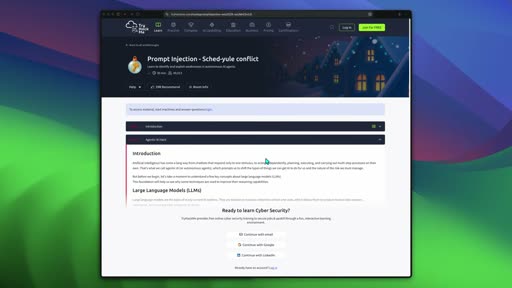
directly on the browser. No setup, no VM nonsense. You just open the lab and start. For example, one of the rooms gives you an AI calendar assistant that knows the CEO's email address, but has been told never to reveal it. Ask directly, it refuses. But there's a malicious instruction hidden inside the calendar event. And if you get the assistant to process it right away, you can actually make it leak the email. And that's just one room. The path also gets into things like...
[06:11]
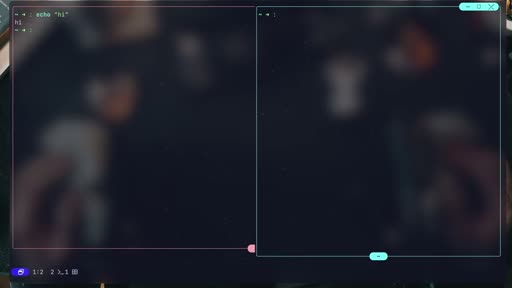
Windows, but is it part of the terminal? I'm not convinced yet. R will help you with renaming windows, making it helpful when switching, but it's not perfect in terms of actually making it obvious that you're editing a name. Okay, now if we start overloading the PES with data like top and htop, this actually looks quite good. Still organized, not too much space taken for context. I like it. The splitting and organization still work flawlessly with running processes in...
[07:47]
this palette, I want to move over to the next level of toyos. The sessions. Sessions is where I had my hopes up. It's what I love about T-Max. It's what I missed in other multiplexers and it's why I built my own team access session manager that I still use to this day. Basically a great way to containerize [music] work tabs, windows and everything and then switch over to an entirely new environment. And while you can do that with 2, it's not super polished. Either that or...
[09:12]
features, you'll find the super useful copy mode to help you copy and search history. There's a debug log which is probably mostly useful for an AI agent fixing your toios on your local environment. [music] But check this option. Installing toos web as a separate binary then running it would get you a demon running through a web interface which is pretty cool if you think about it for both remote control and collaboration. You can create panes, resize, place, zoom and get...
[10:19]
should take a page from Timok's book and limit. Nevertheless, there's a top bound status bar just the way I like it with machine metrics on the top right corner. Before concluding, people would be mad if I didn't mention this. Two is fully mouse compatible. This means that these panes and their buttons are clickable. You can minimize them and then click the same button to pop it back. You can zoom to full screen and kill a pain. But that's easy. You can also drag it around....
[11:30]
monitoring aren't really part of it and that's on you. And while I have a herder video on the channel, my personal preference is actually different. Check out this video next covering all about workmix, the sweet spot of multiplexing, monitoring, and full terminal control. You can start try HackMe for free through the link below. And if you want premium, use my code for 25% off the annual plan. Thank you for watching.
[11:49]
premium, use my code for 25% off the annual plan. Thank you for watching. I'll see you on the next one.
Transcript
Source: captions.
[00:02] Trigger warning. The following video contains footage of someone trying yet
[00:04] contains footage of someone trying yet another shiny new tool that may be
[00:06] another shiny new tool that may be harmful to some audiences. If this is
[00:08] harmful to some audiences. If this is you, just scroll to the bottom and
[00:10] you, just scroll to the bottom and comment with rage. If you love the
[00:12] comment with rage. If you love the terminal, you're about to see something
[00:13] terminal, you're about to see something you've never seen before, something
[00:15] you've never seen before, something different, a concept. No, not a concept,
[00:18] different, a concept. No, not a concept, a project that's ready for you to adopt.
[00:20] a project that's ready for you to adopt. You've seen Timox, you've seen Herder.
[00:22] You've seen Timox, you've seen Herder. If you're on this channel, you've seen
[00:24] If you're on this channel, you've seen Ghosty and Zelage. And while all provide
[00:26] Ghosty and Zelage. And while all provide some form of multiplexing, none of them
[00:28] some form of multiplexing, none of them are sleek, smooth, or as innovative as
[00:31] are sleek, smooth, or as innovative as Tuios or Tuios. Anyway, depending on
[00:34] Tuios or Tuios. Anyway, depending on your nerd level, you may have also
[00:36] your nerd level, you may have also noticed Mitchell Hashimoto, creator of
[00:37] noticed Mitchell Hashimoto, creator of Ghosty, launching a terminal company
[00:39] Ghosty, launching a terminal company meant to provide the next generation of
[00:41] meant to provide the next generation of multipplexing with demos that are so
[00:43] multipplexing with demos that are so smooth you'd want to grab it and try.
[00:46] smooth you'd want to grab it and try. What if I told you you already can? I
[00:48] What if I told you you already can? I mean, almost. with an open source that's
[00:50] mean, almost. with an open source that's growing in popularity where you can go
[00:52] growing in popularity where you can go beyond multiplexing. It's a tiling
[00:54] beyond multiplexing. It's a tiling manager with beautiful design by default
[00:56] manager with beautiful design by default where you can split and zoom but also
[00:59] where you can split and zoom but also drag and drop tile and collapse a
[01:01] drag and drop tile and collapse a terminal UI operating system if you
[01:03] terminal UI operating system if you will. Let's [laughter] get into it. Oh,
[01:05] will. Let's [laughter] get into it. Oh, and you can drop the angry comments
[01:07] and you can drop the angry comments right now and then keep watching.
[01:16] [music] I'll get right to it. Tuyios is one of those open source projects who
[01:18] one of those open source projects who really don't have enough stars yet. A
[01:20] really don't have enough stars yet. A quick look at the landing page would get
[01:22] quick look at the landing page would get anyone who loves the terminal excited.
[01:24] anyone who loves the terminal excited. Floating dragable panes, Vimlike
[01:26] Floating dragable panes, Vimlike interface, workspaces, and a bakedin
[01:29] interface, workspaces, and a bakedin tiling manager if you want it. You get
[01:32] tiling manager if you want it. You get beautiful defaults we've all got used to
[01:34] beautiful defaults we've all got used to with herder and similar multiplexers and
[01:36] with herder and similar multiplexers and even tape scripting which is a cool yet
[01:39] even tape scripting which is a cool yet niche addition we'll get to later. to
[01:41] niche addition we'll get to later. to OOS was built by a developer from the
[01:43] OOS was built by a developer from the Emirates who's taunting you from their
[01:46] Emirates who's taunting you from their GitHub page. [music] I'm sure the HH
[01:48] GitHub page. [music] I'm sure the HH would approve. Let's stop for a second
[01:49] would approve. Let's stop for a second and ask the question 83% of you are
[01:52] and ask the question 83% of you are currently yelling at the screen. Why
[01:54] currently yelling at the screen. Why does the world need another multiplexer?
[01:56] does the world need another multiplexer? And while I can say why not and move on,
[01:59] And while I can say why not and move on, let's be honest, I'm not leaving T-Max.
[02:01] let's be honest, I'm not leaving T-Max. Not for Zelage, not even for Herder,
[02:03] Not for Zelage, not even for Herder, which is currently running on my home
[02:05] which is currently running on my home lab. And the home lab is exactly the
[02:07] lab. And the home lab is exactly the reason where these types of projects
[02:09] reason where these types of projects live. At least for me, instead of
[02:11] live. At least for me, instead of porting my complicated T-Max setup, I
[02:13] porting my complicated T-Max setup, I can just set something light, beautiful,
[02:15] can just set something light, beautiful, and modern in seconds on any machine
[02:17] and modern in seconds on any machine anywhere. And once you'll see what this
[02:20] anywhere. And once you'll see what this one brings to the table, you might
[02:22] one brings to the table, you might actually replace your local setup, too.
[02:24] actually replace your local setup, too. And if this doesn't cut it for you, just
[02:27] And if this doesn't cut it for you, just consider Mitchell Hashimoto, founder of
[02:29] consider Mitchell Hashimoto, founder of Hashi Coror, author of Ghosty Terminal,
[02:30] Hashi Coror, author of Ghosty Terminal, which announced a couple of months back
[02:32] which announced a couple of months back he's starting a company for terminal
[02:34] he's starting a company for terminal multiplexing. Superlogical is still a
[02:37] multiplexing. Superlogical is still a mystery. Claims to have a nonai and
[02:39] mystery. Claims to have a nonai and handwritten code which I'm doubting will
[02:42] handwritten code which I'm doubting will hold for long. But if you know where to
[02:44] hold for long. But if you know where to look, Mitchell had already shared some
[02:46] look, Mitchell had already shared some pretty amazing demos. Beautiful panes,
[02:48] pretty amazing demos. Beautiful panes, fuzzy pickers, curved edges with
[02:50] fuzzy pickers, curved edges with autotiling, things we can all envy and
[02:52] autotiling, things we can all envy and surely aren't available with anything
[02:54] surely aren't available with anything currently on the market. Or is it? Well,
[02:58] currently on the market. Or is it? Well, let's see. Brew install to then run it.
[03:00] let's see. Brew install to then run it. And there we are. refer stalled to hit N
[03:03] And there we are. refer stalled to hit N which then pops the first window. A nice
[03:06] which then pops the first window. A nice small pane with my shell and what looks
[03:09] small pane with my shell and what looks like clickable options. Let's put a pin
[03:11] like clickable options. Let's put a pin in that. Hitting age which is obviously
[03:13] in that. Hitting age which is obviously left in Vim shoots the pane to cover the
[03:16] left in Vim shoots the pane to cover the left half of the screen. Question mark
[03:18] left half of the screen. Question mark will show you this UI with keys and
[03:20] will show you this UI with keys and actions but also other tabs with
[03:23] actions but also other tabs with workspaces, layout tiling splits and
[03:25] workspaces, layout tiling splits and more goodies. We'll get to all that
[03:27] more goodies. We'll get to all that soon. Now that I have a bit more real
[03:29] soon. Now that I have a bit more real estate, I can start another pane, which
[03:32] estate, I can start another pane, which with no instruction pops midscreen. You
[03:34] with no instruction pops midscreen. You may have noticed the bottom left corner
[03:37] may have noticed the bottom left corner now reflects the existence of two panes.
[03:39] now reflects the existence of two panes. And now I can do something you've never
[03:41] And now I can do something you've never seen any terminal multiplexer doing
[03:43] seen any terminal multiplexer doing before. I'll hit M and get a pane
[03:46] before. I'll hit M and get a pane minimized indicated by a green label on
[03:48] minimized indicated by a green label on the bottom. You can hit shift M to
[03:50] the bottom. You can hit shift M to restore all minimized windows. And if
[03:52] restore all minimized windows. And if you can't remember, the help menu is
[03:54] you can't remember, the help menu is your best friend. X kills the window
[03:56] your best friend. X kills the window where killing the last of them gets you
[03:59] where killing the last of them gets you back to the main screen. As you've
[04:01] back to the main screen. As you've noticed, we're still not getting any
[04:03] noticed, we're still not getting any tiling and new panes can overflow on
[04:05] tiling and new panes can overflow on each other. What we can do at this
[04:07] each other. What we can do at this point, however, is arrange them. We
[04:09] point, however, is arrange them. We talked earlier about H and L splitting
[04:11] talked earlier about H and L splitting the screen. Here with 1 2 3 or four, we
[04:14] the screen. Here with 1 2 3 or four, we can place a pane in one of the quarters.
[04:16] can place a pane in one of the quarters. [music] You will also notice the sweet
[04:18] [music] You will also notice the sweet touch of animation while things
[04:20] touch of animation while things transition. Now, you know what I in Vim
[04:23] transition. Now, you know what I in Vim does, right? [music] Insert mode.
[04:25] does, right? [music] Insert mode. Correct. Check out toios changing to
[04:27] Correct. Check out toios changing to terminal mode with the border
[04:29] terminal mode with the border highlighted. And we can now control the
[04:31] highlighted. And we can now control the shell within the pane. You may have
[04:33] shell within the pane. You may have forgotten, but that's why we're here. F
[04:36] forgotten, but that's why we're here. F will send the pain to full screen.
[04:37] will send the pain to full screen. Similar to Z for zooming using most
[04:40] Similar to Z for zooming using most other alternatives like T-Max. Now,
[04:42] other alternatives like T-Max. Now, there's a slight visual problem with
[04:44] there's a slight visual problem with understanding what's going on. For
[04:46] understanding what's going on. For example, with another paint stretched on
[04:48] example, with another paint stretched on top of the previous one, you can't
[04:49] top of the previous one, you can't really tell what's going on. You can use
[04:51] really tell what's going on. You can use the index below, but that's not perfect.
[04:54] the index below, but that's not perfect. AI security is one of those things
[04:57] AI security is one of those things everyone talks about, but most of us
[04:59] everyone talks about, but most of us have never actually tried breaking an AI
[05:01] have never actually tried breaking an AI system. Try Hackme is the world's
[05:03] system. Try Hackme is the world's largest hands-on cyber security training
[05:05] largest hands-on cyber security training platform with over 8 million users
[05:07] platform with over 8 million users globally. On the platform, anyone can
[05:09] globally. On the platform, anyone can learn cyber security, no matter the
[05:11] learn cyber security, no matter the experience level. They've built an
[05:13] experience level. They've built an entire AI security learning path and
[05:15] entire AI security learning path and instead of just watching videos about
[05:17] instead of just watching videos about prompt injection or jailbreaking, you
[05:19] prompt injection or jailbreaking, you actually get to attack live systems
[05:21] actually get to attack live systems directly on the browser. No setup, no VM
[05:23] directly on the browser. No setup, no VM nonsense. You just open the lab and
[05:25] nonsense. You just open the lab and start. For example, one of the rooms
[05:27] start. For example, one of the rooms gives you an AI calendar assistant that
[05:29] gives you an AI calendar assistant that knows the CEO's email address, but has
[05:32] knows the CEO's email address, but has been told never to reveal it. Ask
[05:34] been told never to reveal it. Ask directly, it refuses. But there's a
[05:36] directly, it refuses. But there's a malicious instruction hidden inside the
[05:38] malicious instruction hidden inside the calendar event. And if you get the
[05:40] calendar event. And if you get the assistant to process it right away, you
[05:42] assistant to process it right away, you can actually make it leak the email. And
[05:44] can actually make it leak the email. And that's just one room. The path also gets
[05:46] that's just one room. The path also gets into things like jailbreaking, a supply
[05:48] into things like jailbreaking, a supply chain attacks, and data poisoning. You
[05:50] chain attacks, and data poisoning. You can start Try HackMe for free through
[05:52] can start Try HackMe for free through the link below. And if you want premium,
[05:54] the link below. And if you want premium, use my code for 25% off the annual plan.
[05:57] use my code for 25% off the annual plan. Now, back to the video. This is kind of
[05:58] Now, back to the video. This is kind of where the line blurs between an easy to
[06:01] where the line blurs between an easy to operate multiplexer to a Windows-based
[06:04] operate multiplexer to a Windows-based operating system that we all know. It
[06:06] operating system that we all know. It obviously works with Mac, Linux, and
[06:08] obviously works with Mac, Linux, and Windows, but is it part of the terminal?
[06:11] Windows, but is it part of the terminal? I'm not convinced yet. R will help you
[06:13] I'm not convinced yet. R will help you with renaming windows, making it helpful
[06:15] with renaming windows, making it helpful when switching, but it's not perfect in
[06:17] when switching, but it's not perfect in terms of actually making it obvious that
[06:19] terms of actually making it obvious that you're editing a name. Okay, now if we
[06:22] you're editing a name. Okay, now if we start overloading the PES with data like
[06:24] start overloading the PES with data like top and htop, this actually looks quite
[06:27] top and htop, this actually looks quite good. Still organized, not too much
[06:29] good. Still organized, not too much space taken for context. I like it. The
[06:32] space taken for context. I like it. The splitting and organization still work
[06:34] splitting and organization still work flawlessly with running processes in
[06:36] flawlessly with running processes in Windows without hiccups or any problem.
[06:38] Windows without hiccups or any problem. Up until now, we've seen basics, but
[06:40] Up until now, we've seen basics, but this system actually comes with a cheat
[06:42] this system actually comes with a cheat code. Remember [music] T-Max default
[06:44] code. Remember [music] T-Max default prefix controlB? Well, check this out.
[06:47] prefix controlB? Well, check this out. Same prefix works for 2, but not only
[06:49] Same prefix works for 2, but not only preparing for your next keystroke, it'll
[06:51] preparing for your next keystroke, it'll also pop a prefix helper list for you to
[06:54] also pop a prefix helper list for you to pick an option from. Much like Lazy Vim
[06:56] pick an option from. Much like Lazy Vim for those of you who know it, this will
[06:58] for those of you who know it, this will get you quicker access to basic
[07:00] get you quicker access to basic commands, moving around, layouts, scroll
[07:02] commands, moving around, layouts, scroll mode, and more. But wait, hit T for
[07:04] mode, and more. But wait, hit T for example for window commands, and you're
[07:07] example for window commands, and you're passed to a nested menu of options. If
[07:09] passed to a nested menu of options. If you pick the same menu and hit T again,
[07:12] you pick the same menu and hit T again, you've now toggled tiling mode. No more
[07:14] you've now toggled tiling mode. No more overflating windows, and we're moving
[07:16] overflating windows, and we're moving from an operating system-like option to
[07:18] from an operating system-like option to a more familiar terminal split setup. I
[07:21] a more familiar terminal split setup. I must say, it looks beautiful where it's
[07:23] must say, it looks beautiful where it's split and tied like that. There's room
[07:25] split and tied like that. There's room to breathe. The focus is obvious.
[07:27] to breathe. The focus is obvious. Zooming in and out are responsive.
[07:29] Zooming in and out are responsive. Sweet. Now, here is another nugget that
[07:32] Sweet. Now, here is another nugget that will make your life even nicer. Too
[07:34] will make your life even nicer. Too comes with its own fuzzy searchable
[07:36] comes with its own fuzzy searchable command pallet. I came across it by
[07:38] command pallet. I came across it by accident, but Ctrl P and you get all the
[07:41] accident, but Ctrl P and you get all the options in a fuzzy picker. And through
[07:43] options in a fuzzy picker. And through this palette, I want to move over to the
[07:45] this palette, I want to move over to the next level of toyos. The sessions.
[07:48] next level of toyos. The sessions. Sessions is where I had my hopes up.
[07:51] Sessions is where I had my hopes up. It's what I love about T-Max. It's what
[07:53] It's what I love about T-Max. It's what I missed in other multiplexers and it's
[07:55] I missed in other multiplexers and it's why I built my own team access session
[07:57] why I built my own team access session manager that I still use to this day.
[07:59] manager that I still use to this day. Basically a great way to containerize
[08:01] Basically a great way to containerize [music] work tabs, windows and
[08:02] [music] work tabs, windows and everything and then switch over to an
[08:04] everything and then switch over to an entirely new environment. And while you
[08:06] entirely new environment. And while you can do that with 2, it's not super
[08:09] can do that with 2, it's not super polished. Either that or I'm not getting
[08:11] polished. Either that or I'm not getting something. You be the judge. When you
[08:14] something. You be the judge. When you start to it basically starts a session.
[08:16] start to it basically starts a session. You can give it a name and while it's
[08:18] You can give it a name and while it's running, let's use its pes to see active
[08:20] running, let's use its pes to see active sessions. Right off the bat, this is
[08:22] sessions. Right off the bat, this is strange. Status detached. I mean, I'm
[08:24] strange. Status detached. I mean, I'm literally in it. But wait, if I hit Q,
[08:27] literally in it. But wait, if I hit Q, I'm told that we're detached from a
[08:29] I'm told that we're detached from a session, just like in T-Max, right?
[08:31] session, just like in T-Max, right? Well, ls comes back with nothing, which
[08:34] Well, ls comes back with nothing, which means that the attach command will not
[08:36] means that the attach command will not really attach, but rather create a new
[08:38] really attach, but rather create a new session. Confused? So am I. So, there's
[08:41] session. Confused? So am I. So, there's a toy kill session command just like in
[08:43] a toy kill session command just like in T-Max, but mostly there's nothing to
[08:45] T-Max, but mostly there's nothing to kill. If I start another session on
[08:48] kill. If I start another session on another well TX window, I can list the
[08:51] another well TX window, I can list the two. But how do I detach? There's no
[08:53] two. But how do I detach? There's no detach command. What there is, however,
[08:56] detach command. What there is, however, is prefix D. Then it'll tell us we're
[08:58] is prefix D. Then it'll tell us we're detached. Same as earlier, but this time
[09:01] detached. Same as earlier, but this time ls gives us both sessions. Both are
[09:04] ls gives us both sessions. Both are still detached despite it not being the
[09:06] still detached despite it not being the case. It works. Among other T-Max
[09:08] case. It works. Among other T-Max features, you'll find the super useful
[09:10] features, you'll find the super useful copy mode to help you copy and search
[09:12] copy mode to help you copy and search history. There's a debug log which is
[09:14] history. There's a debug log which is probably mostly useful for an AI agent
[09:17] probably mostly useful for an AI agent fixing your toios on your local
[09:19] fixing your toios on your local environment. [music] But check this
[09:20] environment. [music] But check this option. Installing toos web as a
[09:23] option. Installing toos web as a separate binary then running it would
[09:26] separate binary then running it would get you a demon running through a web
[09:28] get you a demon running through a web interface which is pretty cool if you
[09:29] interface which is pretty cool if you think about it for both remote control
[09:31] think about it for both remote control and collaboration. You can create panes,
[09:33] and collaboration. You can create panes, resize, place, zoom and get the perfect
[09:36] resize, place, zoom and get the perfect experience through HTTP. Another thing
[09:39] experience through HTTP. Another thing you can do, and man, that's a great idea
[09:42] you can do, and man, that's a great idea for a T-mix plug-in, is save a layout.
[09:45] for a T-mix plug-in, is save a layout. Then using the command pallet, even
[09:47] Then using the command pallet, even through our web view, we can load the
[09:49] through our web view, we can load the trying out to layout, restoring the view
[09:52] trying out to layout, restoring the view and tiling it for me. Okay, time for
[09:55] and tiling it for me. Okay, time for what most of you are probably dying to
[09:57] what most of you are probably dying to see, the config. As you'd imagine,
[09:59] see, the config. As you'd imagine, there's a toml file under doconfig toos.
[10:02] there's a toml file under doconfig toos. You can change the border, buttons,
[10:04] You can change the border, buttons, clocks, and even show CPU and memory
[10:06] clocks, and even show CPU and memory usage, which I'll quickly add. The
[10:08] usage, which I'll quickly add. The entire set of options is customizable to
[10:10] entire set of options is customizable to your liking. And there's a well toos
[10:13] your liking. And there's a well toos within the toos. Something I think they
[10:16] within the toos. Something I think they should take a page from Timok's book and
[10:17] should take a page from Timok's book and limit. Nevertheless, there's a top bound
[10:20] limit. Nevertheless, there's a top bound status bar just the way I like it with
[10:22] status bar just the way I like it with machine metrics on the top right corner.
[10:25] machine metrics on the top right corner. Before concluding, people would be mad
[10:26] Before concluding, people would be mad if I didn't mention this. Two is fully
[10:29] if I didn't mention this. Two is fully mouse compatible. This means that these
[10:32] mouse compatible. This means that these panes and their buttons are clickable.
[10:34] panes and their buttons are clickable. You can minimize them and then click the
[10:36] You can minimize them and then click the same button to pop it back. You can zoom
[10:38] same button to pop it back. You can zoom to full screen and kill a pain. But
[10:41] to full screen and kill a pain. But that's easy. You can also drag it
[10:43] that's easy. You can also drag it around. And if you toggle tiling mode
[10:46] around. And if you toggle tiling mode again, dragging around would drop the
[10:48] again, dragging around would drop the tiles into their respective places. Yet
[10:50] tiles into their respective places. Yet another thing you've never seen in your
[10:52] another thing you've never seen in your terminal, did you? There are still
[10:54] terminal, did you? There are still things I haven't covered here. There's a
[10:56] things I haven't covered here. There's a tape feature and even a hidden work tree
[10:58] tape feature and even a hidden work tree option, at least according to the docs.
[11:00] option, at least according to the docs. But I'll leave meat for a follow-up. The
[11:02] But I'll leave meat for a follow-up. The bottom line is to OS has it all when it
[11:04] bottom line is to OS has it all when it comes to visuals, the motions, the mouse
[11:06] comes to visuals, the motions, the mouse control, the beautiful defaults. There
[11:08] control, the beautiful defaults. There are even sessions, although not fully
[11:11] are even sessions, although not fully baked yet if you ask me. So it's a
[11:13] baked yet if you ask me. So it's a fantastic multiplexer for your remote
[11:15] fantastic multiplexer for your remote host, your temporary cloud instance,
[11:16] host, your temporary cloud instance, your agents box, whatever. I won't give
[11:19] your agents box, whatever. I won't give up demos just yet. You may be screaming
[11:21] up demos just yet. You may be screaming herder at the screen, and you're not
[11:23] herder at the screen, and you're not wrong. Too focuses on visuals and
[11:25] wrong. Too focuses on visuals and multiplexing. Agent automation and
[11:27] multiplexing. Agent automation and monitoring aren't really part of it and
[11:30] monitoring aren't really part of it and that's on you. And while I have a herder
[11:32] that's on you. And while I have a herder video on the channel, my personal
[11:34] video on the channel, my personal preference is actually different. Check
[11:36] preference is actually different. Check out this video next covering all about
[11:38] out this video next covering all about workmix, the sweet spot of multiplexing,
[11:40] workmix, the sweet spot of multiplexing, monitoring, and full terminal control.
[11:43] monitoring, and full terminal control. You can start try HackMe for free
[11:45] You can start try HackMe for free through the link below. And if you want
[11:46] through the link below. And if you want premium, use my code for 25% off the
[11:49] premium, use my code for 25% off the annual plan. Thank you for watching.
[11:51] annual plan. Thank you for watching. I'll see you on the next one.
All frames
Total: 12. Hero frames flagged with star.
frames/frame_0001.jpg(t=00:00)frames/frame_0002.jpg(t=00:25)frames/frame_0003.jpg(t=01:48)frames/frame_0004.jpg(t=02:09)frames/frame_0005.jpg(t=04:54)frames/frame_0006.jpg(t=05:26)frames/frame_0007.jpg(t=06:12)frames/frame_0008.jpg(t=07:48)frames/frame_0009.jpg(t=09:12)frames/frame_0010.jpg(t=10:19)frames/frame_0011.jpg(t=11:31)frames/frame_0012.jpg(t=11:50)